Is Your Social Media Profile Picture Holding You Back?
What makes a strong profile picture for creators, professionals and brands: framing, contrast at small sizes, logo vs face, sizes by network and video profiles.
On this page
- Key takeaways
- Signs your profile picture is working against you
- What makes the best profile picture
- Logo vs face profile picture: which should you use?
- Profile picture size by network
- Keep it consistent across networks
- Your link in bio page: photo or video
- A ten-minute profile picture check
- Frequently asked questions
Your social media profile picture is the smallest image you publish and the one people see most. It sits next to every comment, every DM, every search result and every story ring, usually at the size of a fingertip. If it is dark, busy or out of date, people scroll past without knowing who you are.
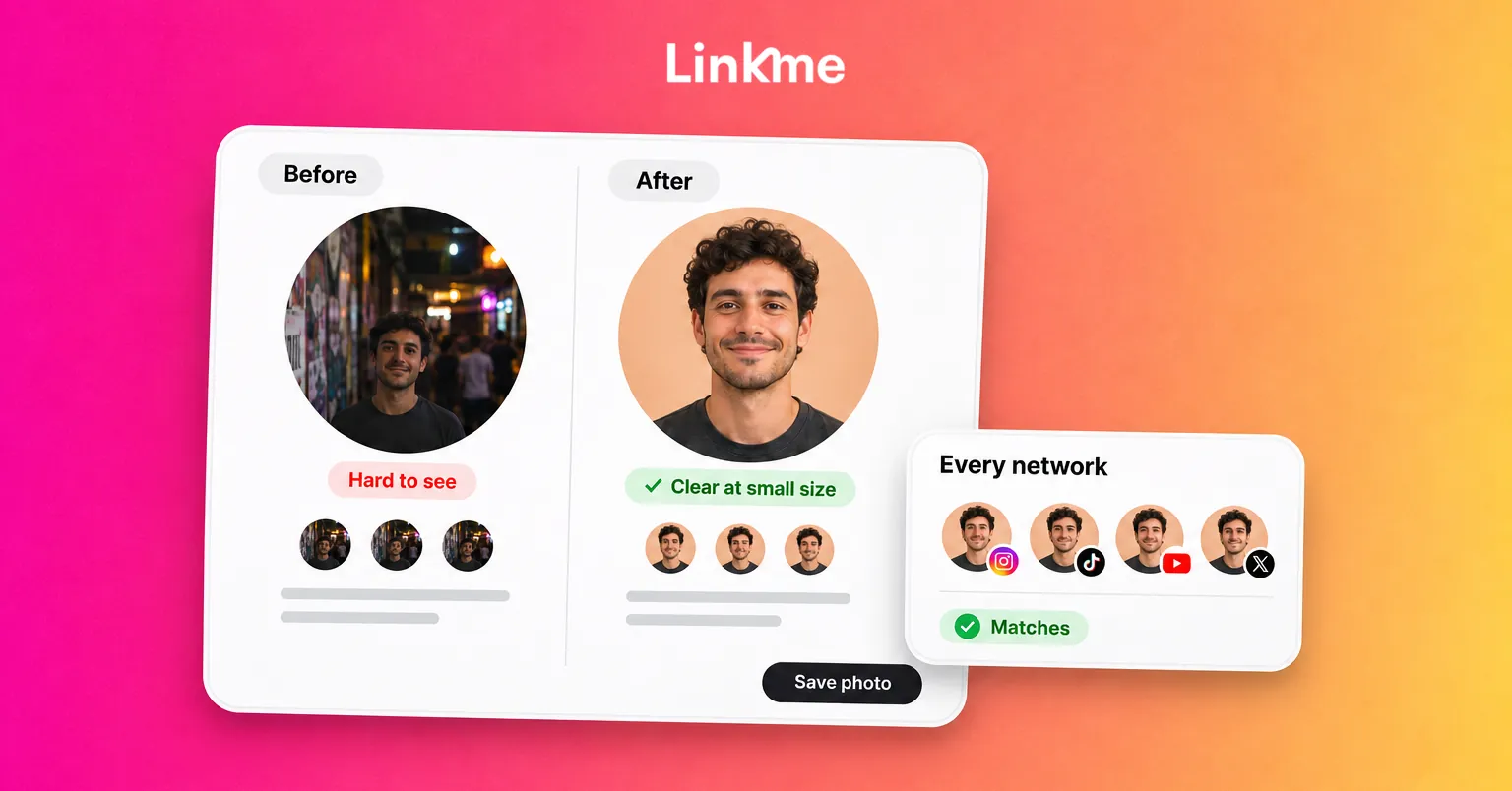
The fix is rarely a new photo shoot. Most weak profile pictures fail on a few specific points: the subject is too small in the frame, the contrast disappears at thumbnail size, or the image changes from one network to the next. This guide covers what makes a strong profile picture for creators, professionals and brands, when to use a logo instead of a face, and how to check yours in ten minutes.
Signs your profile picture is working against you
A profile picture rarely fails loudly. It just makes people hesitate. Look for these signs:
- People ask if it is really you. Fans or customers DM to check whether an account is official, or tag the wrong account.
- It disappears in a comment thread. Next to other avatars, yours reads as a gray or dark blob.
- It no longer matches you. The photo is several years old, the logo was redesigned, or the business moved on from that look.
- It changes everywhere. A beach photo on Instagram, a headshot on LinkedIn and an old logo on X make it harder to confirm the accounts belong together.
- It was cropped by accident. The top of a head, a logo’s last letter or a product sits outside the circle.
If two or more apply, the picture is costing you recognition.
What makes the best profile picture
Fill the frame
Most networks crop the profile picture to a circle. Anything near the corners of your square upload is lost. For a face, frame from the top of the shoulders to just above the head, so the face takes up most of the circle. For a logo, use the mark or monogram rather than a long wordmark, with even padding on every side.
Build contrast for small sizes
At thumbnail size, detail vanishes and only shapes and contrast remain. A face lit from the front against a plain, lighter or darker background reads clearly. A face in shadow against a busy street does not. Pick one strong background color that separates you from the subject, and avoid fine text, thin lines and gradients that turn to mush when shrunk.
Keep the expression and styling on-brand
The picture should look like the person or business people will meet. A coach or consultant usually wants a warm, direct look at the camera. A musician or athlete can use a performance shot if the face stays readable. A restaurant or retailer can use its mark, or a single signature product if the brand is known for it. Whatever you choose, avoid filters that change skin tone or color so much that the picture no longer looks like you.
Use a sharp, recent image
Start from a high-resolution, well-lit photo taken recently. Group photos, sunglasses and images with someone cropped out make you harder to recognize.
Logo vs face profile picture: which should you use?
The rule is simple: show what people follow. If they follow a person, show the person. If they follow a brand, show the brand.
| Account type | Best choice | Why |
|---|---|---|
| Creator, athlete, artist | Face | People follow the person and look for the face in comments and DMs |
| Consultant, freelancer, agent | Face | Trust comes from knowing who you will deal with |
| Founder-led small business | Face or logo | Use the face if the founder is the voice of the account; use the logo if staff post too |
| Brand, product, venue | Logo | The account speaks for the business, and the logo matches packaging, signs and ads |
| Multi-location business | Logo, same on every location | Customers should recognize every location as part of the same business |
Profile picture size by network
Upload a square image and keep the important part inside the center circle. Larger uploads stay sharp on high-density screens. Official guidance at the time of writing:
| Network | Official guidance |
|---|---|
| YouTube | Renders at 98 x 98 pixels; JPG, GIF, BMP or PNG, no animated GIFs (YouTube Help) |
| Between 400 x 400 and 7680 x 4320 pixels, PNG or JPG, up to 8 MB (LinkedIn Help) | |
| Instagram, TikTok, Facebook, X | Square upload shown in a circle; check the preview in the app before saving |
A practical default is a square image of at least 800 x 800 pixels, exported as a JPG or PNG, with the subject centered. It clears LinkedIn’s minimum, stays sharp when YouTube shrinks it to 98 pixels, and works as one master file for every network above.
Keep it consistent across networks
Consistency helps people confirm they found the right account. It also makes impersonators easier to spot, because the real accounts all look alike.
- Use the same picture, or the same crop of the same photo, on every network.
- When you update it, update everywhere on the same day.
- Match the profile picture to the one on your link in bio page, since that page is where people check that your accounts belong together.
- Keep the same color behind your logo or face across networks.
Your link in bio page: photo or video
Your link in bio page is often the first full-screen view someone gets of you after tapping your bio, so the profile picture there carries more weight than anywhere else.
On a Linkme page, your profile photo introduces a page that holds your links, events, videos and products. You can also put a video behind your profile photo or in its place, with styles such as Cinematic Blur and Dynamic Frame, as the Linkme FAQ describes. A short loop works well for performers, venues and products that look better moving: a crowd at a show, a dish being plated, a training clip.
Two rules keep a video profile from backfiring:
- The still image must still work. Your profile photo appears on its own in many places, so it needs the same framing and contrast as anywhere else.
- Keep the loop calm. A short, steady clip reads better than fast cuts, and it should not compete with the links below it.
If you would rather not open the editor, Link, Linkme’s AI social media manager on the Pro plan, can update the profile photo or video profile when you attach an image and ask. Link lines the change up for your approval, and nothing changes on your page until you press Approve.
A ten-minute profile picture check
- Open your profile on your phone and look at the picture in a comment thread, not on your profile.
- Ask someone who does not know you well what they see. If they hesitate, the picture is too busy or too dark.
- Check the crop: is anything important cut off by the circle?
- Compare every network side by side. Note any that use an older or different image.
- Decide face or logo using the table above.
- Export one square master file and replace the picture everywhere on the same day.
- Open your link in bio page and confirm the photo, or video profile, matches.
Frequently asked questions
What is the best profile picture for social media?
A sharp, recent, well-lit image where the face or logo fills most of the circular crop, set against a plain background that contrasts with it. It should look like the person or business people will deal with and match your other accounts.
Should a business use a logo or a face as its profile picture?
Use a logo when the account speaks for the brand, a venue or a product, and a face when people follow a specific person, such as a creator, consultant or founder who is the voice of the account. Multi-location businesses should use the same logo for every location.
What size should a social media profile picture be?
Upload a square image and keep the subject centered. LinkedIn accepts images from 400 x 400 pixels, and YouTube renders the picture at 98 x 98 pixels. A square of at least 800 x 800 pixels stays sharp across the major networks; check the circle preview in each app before saving.
How often should I change my profile picture?
Change it when it no longer looks like you, when the brand changes, or when it fails the small-size test. Frequent changes make you harder to recognize, so when you do change it, update every network at once.