How to Accept Payments Through Social Media With a Checkout on Your Page
Followers tap your bio link, pay with a phone wallet or card, and digital products arrive on their own. Here is how payouts and fees work.
On this page
The simplest way to accept payments through social media is to give followers one place to pay: a page in your bio with a real checkout, where they can tip you or buy something with Apple Pay, Google Pay or a card. Asking people to “DM me for payment details” adds steps, loses buyers along the way and leaves you without a record of who paid for what. This guide covers what you can sell this way, how payouts and fees work, and what to check before you publish your first product.
Why a checkout beats “send me the money”
Plenty of creators and small businesses still sell by direct message. A follower asks about a preset pack, you reply with a payment handle, they send money, and you email the file by hand. It works at five orders a month. At fifty, it falls apart.
A checkout on your page fixes the parts that break:
- Fewer steps for the buyer. They tap your bio link, pick the product and pay with a wallet already on their phone.
- Automatic delivery. A digital product arrives the moment the payment clears, including at 3 a.m.
- A clean record. Every order has a total, the fees taken and what you received, which you need for bookkeeping and taxes.
- A proper payment processor. Card and wallet payments go through a processor with its own dispute process, not an informal transfer between personal accounts.
If you already sell through a store or payment app and want to link to it instead, that is a different setup with its own trade-offs. The rest of this guide focuses on taking payment on the page itself.
What followers can pay you for
Most social sellers combine two or three of these. Pick the ones that match what your audience already asks you for.
| What you sell | How it works for the buyer | Good fit for |
|---|---|---|
| Tips | Picks an amount, adds a note and pays | Musicians, streamers, educators who publish free content |
| Digital download | Pays once and gets the file instantly | Presets, templates, guides, ebooks, music |
| Pay to unlock | Sees a blurred preview, pays, and the content opens | Exclusive videos, behind-the-scenes posts, tutorials |
| Course | Pays once and starts the lessons straight away | Skills you already teach in short clips |
| Print on demand merch | Picks a size and pays; the item is printed and shipped | Creators with a recognizable name, logo or catchphrase |
On Linkme, tips and merch work on every page, including the free plan; digital downloads, pay to unlock posts and courses come with Linkme Plus and Pro.
A simple rule for choosing: sell the thing people already ask for in your comments. If followers keep asking about your camera settings, a preset pack beats a hoodie as a first product.
How a checkout on your page works
On Linkme, Sell & Monetize puts the checkout on your Linkme page, processed by Stripe. The setup follows the same order on any similar tool:
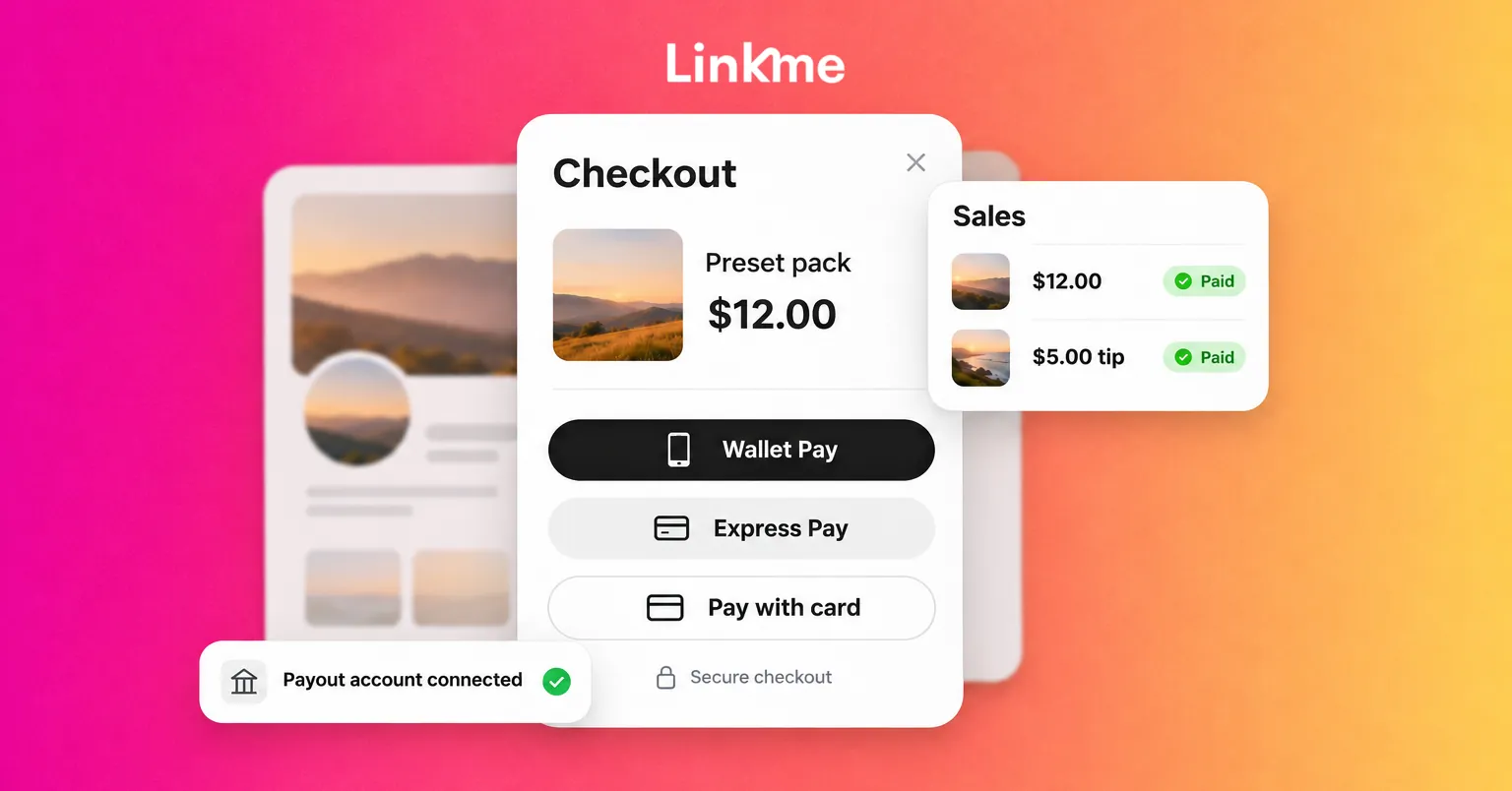
- Connect a payout account. On Linkme you connect a Stripe account once in Payments. Paid products need a verified Stripe account before they publish; free products do not.
- Add the product. Give it a title, description, price and cover image, and upload the file if it is digital.
- Check what you will earn. Linkme shows the fee split in Transaction Fees & Earnings before you publish.
- Publish and put the page in your bio. Products also appear together at link.me/yourname/shop.
- Tell people it exists. A product nobody sees does not sell, so plan the posts that point to it.
How buyers pay
Buyers check out on the page with Apple Pay, Google Pay or a card. For physical merch, shipping and tax are worked out at checkout. Wallets matter on social traffic: nearly everyone arrives on a phone, often inside an in-app browser, and typing card details on a small screen is where many purchases stop.
One payout account per page
Each Linkme page connects its own Stripe payout account, and tips, shop sales and course revenue are paid out by Stripe to the bank behind it, on the payout schedule Stripe sets for your country. That keeps money separate if you run more than one page, such as a personal page and a side brand, or if a manager runs pages for several clients.
Check the fees before you publish
Two fees usually apply to a social checkout:
- A platform fee. On Linkme, this is set by your plan and drops on higher plans. Merch fees are lower on Plus and Pro.
- Payment processing. Stripe charges its own processing fee on every payment, on every plan. Stripe lists its rates by country on its pricing page.
Before you set a price, work out what lands in your account on one sale. On Linkme, Transaction Fees & Earnings shows this before you publish, and each order in Sales shows its total, its fees and what you receive. Do the math on your cheapest product especially: a small fixed processing charge takes a bigger share of a low-priced item than of a course.
It also helps to decide early on:
- Refunds. Write a short refund policy in the product description, especially for digital files that cannot be returned.
- Taxes. Payment platforms report income in many countries. Keep your own records and check your obligations with an accountant.
- What you will not sell this way. Linkme’s checkout does not cover gift cards or discount codes, so plan promotions around price changes or bundles instead.
Taking tips from fans
Tips are the lowest-effort way to start, because there is nothing to build. On a Linkme page, fans pick an amount, add a note and send it, and you see each tip in your recent tips list. Tips come with every Linkme page, including the free plan.
Tips work best when there is a clear reason to give. A few ways to frame them:
- At the end of a free tutorial: “If this saved you an afternoon, you can tip on my page.”
- During or after a livestream, with the link pinned in chat or in the stream description.
- On a free download: give it away, then offer an optional tip.
Getting followers to the checkout
Most sales start with a post, so build the path from post to payment:
- Bio link. Put your page in every bio. On Instagram, keep the page as the first link so it shows without an extra tap.
- Stories with a link sticker. Point to one product, not your whole page.
- Comment to DM. With DM automations, anyone who comments a keyword such as GUIDE gets a DM with the product link. It answers every request at the moment interest is highest.
- Presales. On Linkme you can schedule a product’s release and let buyers pay now; it reaches them automatically on release day.
After the sale, keep the relationship. In Linkme Sales, Export emails saves the email of every buyer in the orders you are viewing, so you can tell past buyers about the next release.
Before you go live: a short checklist
- Payout account connected and verified.
- Product title says exactly what the buyer gets.
- Price checked against fees, so you know your take-home per sale.
- Refund policy in the description.
- Test purchase made from your own phone, through the Instagram or TikTok browser.
- First post and Story planned to announce it.
If you want the full picture of what can be sold and how plans differ, the sales guide walks through each option in order.
Frequently asked questions
Can I accept payments through social media without a website?
Yes. A link in bio page with a built-in checkout does the job of a small store. Followers tap the link in your profile, choose a product or a tip amount and pay on the page, and digital products are delivered automatically.
Do I need a Stripe account to sell on Linkme?
Yes, for paid products. Each Linkme page connects its own Stripe payout account, and Stripe pays out tips, shop sales and course revenue to your bank. Free products can be published without it.
What fees should I expect?
Expect two: a platform fee set by your plan and the payment processor’s fee. On Linkme, the exact split for your plan is shown in Transaction Fees & Earnings before you publish, and every order shows what you received.
Can fans support me without buying anything?
Yes. Tips let fans pay any amount they choose and leave a note, with no product attached. They suit creators who publish mostly free content and want a simple way for regular viewers to give back.