How to Grow Your Instagram: A Practical Playbook
A practical Instagram growth playbook: Reels and carousels, collab posts, trial Reels, searchable captions, a cadence you can keep and comment-to-DM to turn reach into followers.
On this page
How to grow your Instagram comes down to two jobs. First, get your posts in front of people who do not follow you yet. Then give those people a reason to follow, come back and click. Reels and carousels do most of the reaching. Collab posts and trial Reels widen it, searchable captions help people find you, and a steady cadence keeps it going. Comment-to-DM automations turn the attention into followers, leads and clicks you can measure.
This playbook covers each of those in order. It is written for creators and small brands that want steady growth rather than one viral spike.
Start with a profile that converts visits into follows
Reach is wasted if people land on your profile and leave. Before you push for more views, check what a new visitor sees in the first few seconds:
- Name field. Instagram search reads it, so include what you do as well as your name, for example “Maya Brooks | Trail running”.
- Bio. One line on what you post and who it is for, then one line on what to do next.
- Link. Point it to a page with your channels, your latest offer and an email sign-up, not to a single old post.
- Pinned posts. Pin the posts that best explain your account, not simply the ones with the most likes.
- Highlights. Keep a few that answer common questions, such as how to work with you or where to start.
Use the formats Instagram rewards
Reels for reach
Reels are the format most likely to be recommended to people who do not follow you. Treat each one as a first impression:
- Put the hook in the opening seconds. Show the result, state the problem or ask the question straight away.
- Add on-screen text, because many people watch with the sound off.
- Use original video. Instagram says it makes Reels that have already been posted on Instagram less visible.
- End on something worth commenting on or sending to a friend. Instagram’s Reels ranking predicts how likely people are to reshare a Reel, so a video worth passing on gets shown to more people.
Carousels for depth
Carousels work well for tutorials, lists, before-and-afters and anything people want to save. A strong first slide earns the swipe. The middle slides deliver the value, and the last slide asks for a save, share or comment. Write each slide so it makes sense on its own, because people do not always land on the first one.
Stories for the people who already follow you
Stories rarely bring in new followers, but they keep current ones close. Use polls, question stickers and behind-the-scenes clips, and turn what you learn into your next Reel.
Widen your reach with collabs and trial Reels
Collab posts
A collab post is one post or Reel co-authored by two or more accounts. When your collaborator accepts the invite, it appears on their profile as well as yours and goes to both sets of followers. All the views, likes and comments stay on the one post.
Good collab partners:
- Share your audience’s interests without competing directly with you.
- Are a similar size or a little larger. Fit matters more than follower count.
- Bring something to the idea, such as a skill, a location or a point of view.
Agree in advance who posts, what the caption says and when it goes live. Then both of you should reply to comments in the first hour.
Trial Reels
Trial Reels let eligible professional accounts show a Reel to non-followers first. It does not appear on your profile grid or in your followers’ feeds while the test runs. You can then share it with everyone yourself, or let Instagram share it automatically if it performs well. Use trials to test new hooks, formats or topics without cluttering your grid.
Make your posts searchable
People search Instagram for topics, not only for account names. Search reads your name field, captions and on-screen text, so write in the words your audience uses:
- Describe what is in the post plainly. “15 minute protein breakfast” is easier to find than “Monday fuel”.
- Put the main keyword near the start of the caption.
- Use a few specific hashtags rather than a long block of generic ones.
- Add alt text to photos when the image carries meaning.
Public posts from professional accounts can also appear in search engine results. This is controlled by a privacy setting about showing public photos and videos in search engine results, available to eligible public professional accounts. If you want to be found outside the app, check that the setting is on. Then write captions you would be happy to see in a search result.
Keep a cadence you can sustain
Growth compounds when you show up consistently. Pick a mix you can hold for at least three months. For example, two Reels and one carousel a week, plus Stories on most days. Batch-create on one day, then schedule the posts so a busy week does not break the rhythm. The guide on how to schedule Instagram posts covers scheduling Reels and carousels and what still needs to be done live.
Review what worked once a month. Look at reach from non-followers, shares, saves and follows per post, not only likes. Make more of what brought new people in, and stop making what did not.
Turn reach into followers and clicks with comment-to-DM
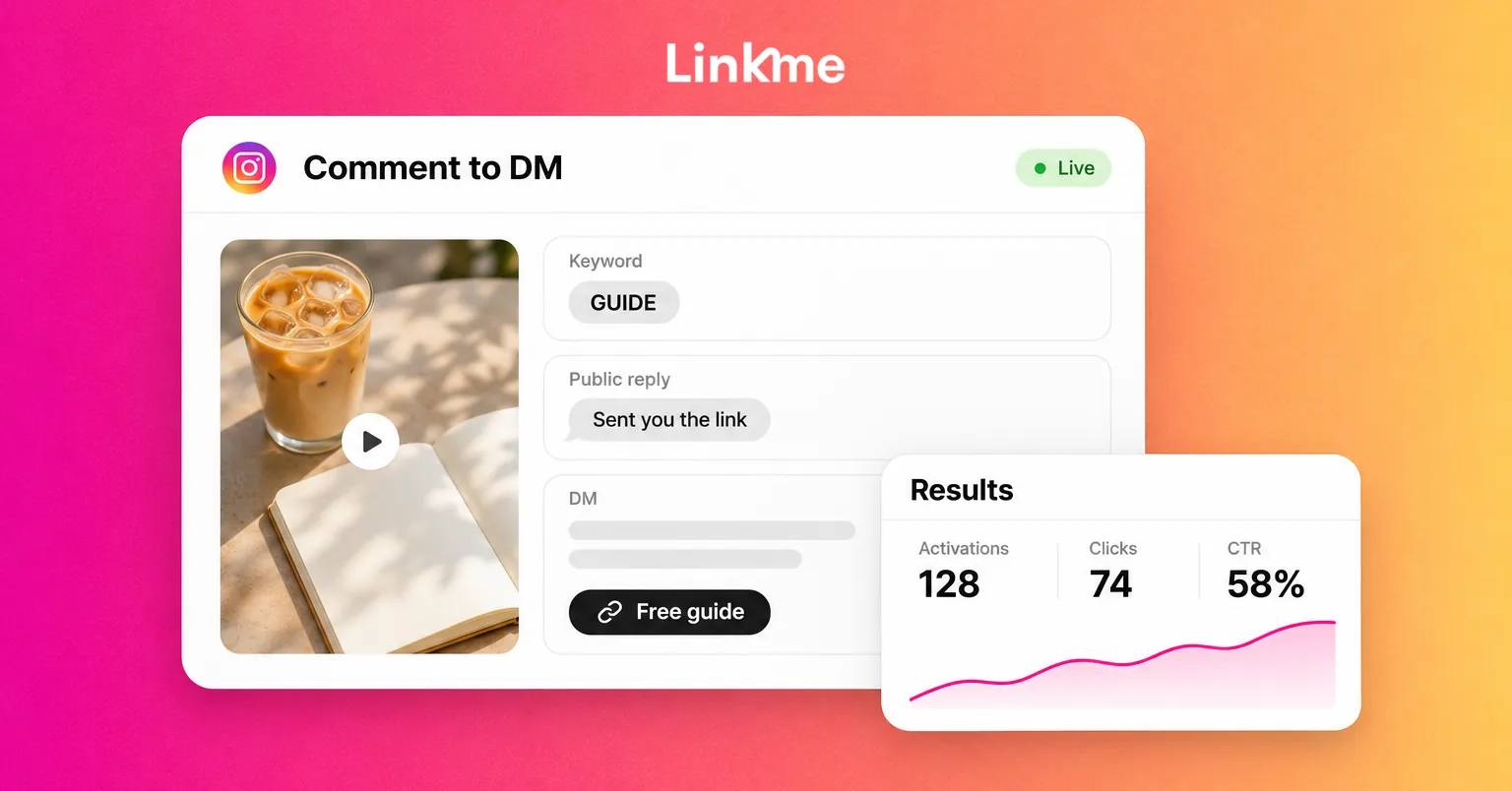
A Reel can reach thousands of people who will never tap the link in your bio. Comment-to-DM closes that gap. You ask viewers to comment a keyword, and they receive the link in their DMs straight away.
Linkme DM Automations set this up on an Instagram business or creator account:
- Pick the posts. Choose a specific post or Reel, or have the automation cover every post you publish from now on.
- Set the trigger. Pick a keyword such as GUIDE, or an emoji, or reply to any comment. A public reply goes up under each matching comment, rotating through up to five variations so the thread reads like a person answered.
- Write the DM. Add your message and any link, such as your free guide, your shop or your Linkme page.
- Check the results. Activations, clicks and click-through rate show which posts and keywords earn their place.
You can also set a delay before the reply and the DM so they feel natural. Every Linkme plan, including Free, can run DM automations, each with its own limits, and Pro has unlimited automations. The article on Instagram comment automation covers keyword choice and caption wording in more depth.
Use it with care. Only offer something genuinely useful in exchange for a comment, say clearly in the caption what people will receive, and do not pad every post with a keyword prompt.
If your link sends people to a creator page, a Linkme page for creators and athletes can hold your channels, products and an email sign-up in one place. People who arrive from a DM then have something to do next.
Frequently asked questions
How long does it take to grow on Instagram?
It depends on your niche, how often you post and how well your content fits what people want. Most accounts see steady gains after a few months of consistent posting, with occasional jumps when a Reel or collab takes off. Look at the trend over several months, not week to week.
Should I post Reels or carousels to grow?
Both, for different jobs. Reels are more likely to reach non-followers. Carousels tend to earn saves and shares from your existing audience. A weekly mix of the two usually works better than relying on one format.
Do hashtags still help on Instagram?
A few specific hashtags can help Instagram understand and categorize a post. Clear wording in your caption, name field and on-screen text matters more for search. Long blocks of generic hashtags add little.
Are collab posts worth it for small accounts?
Yes, when the partner’s audience fits yours. A collab puts one post in front of both audiences and keeps all the engagement in one place. That is often the fastest way for a small account to reach the right new people.


