Social Media Targeting: How Ad Targeting Works Now
Ad targeting now leans on firm limits, your own audience data and creative, with delivery systems doing much of the finding. Here is how to set it up network by network.
On this page
Social media targeting is how you tell an ad network who should see your ad. It used to mean stacking interests and demographics. Now most networks’ delivery systems do much of the finding themselves, so the inputs that matter are your hard limits (where, what language, what minimum age), your own audience data, and above all the creative, which decides who stops scrolling.
This guide covers broad versus narrow audiences, custom audiences, creative as a targeting lever, the rules that restrict targeting, and how targeting differs from one network to the next.
The three inputs you actually control
Think of targeting as three layers:
| Layer | Examples | How the network treats it |
|---|---|---|
| Hard limits | Countries, cities or a radius, language, minimum age, excluded customers | Usually respected as set |
| Signals | Custom audiences, lookalikes, interests, job titles, keywords | Often used as a starting point the system can expand |
| Creative | The hook, format, language, offer and landing page | Shapes who engages, and so who the system shows it to next |
On Meta, for example, Advantage+ audience treats the audience you describe as a suggestion: it prioritizes people who match it, then looks wider. You can still set strict controls, such as location, minimum age, language and custom audience exclusions, that the system will not expand past (Meta: Advantage+ audience). TikTok’s upgraded Smart+ campaigns use automatic targeting by default, with custom targeting available if you need it.
Piling on more interests rarely buys precision. Spend that effort on the hard limits and the creative.
Broad or narrow audiences?
Several networks now advise starting broad. TikTok’s targeting guidance says to start with a broad audience and to narrow only when you have a specific need (TikTok: best practices for targeting). LinkedIn warns against limiting campaigns to a handful of job titles and against stacking so many attributes that the audience becomes too small to deliver.
Narrow targeting still makes sense when:
- The buyer is defined by role or company. A payroll product sold to finance leaders is a fair case for LinkedIn’s job title, seniority and company targeting.
- You can only serve a place. A restaurant, gym or venue should limit location to where customers can actually come.
- You are retargeting. People who visited your page, engaged with your posts or are already on your list are a defined group by design.
- You need to exclude people. Existing customers, recent buyers or employees often should not see an acquisition ad.
Broad works better when the product appeals widely, the network has enough conversion data from your pixel or events to learn from, and your budget is too small to feed several narrow ad sets at once.
Custom audiences: your own data
Custom audiences are built from data you hold: a customer list, visitors to your website, people who watched your videos or engaged with your profile. Networks also use them as the seed for lookalike audiences on the platforms that still offer them.
A few rules to keep in mind:
- Only upload lists you have permission to use for advertising, and keep them current. Remove people who asked not to be contacted.
- Expect minimum sizes. Networks will not run a custom audience that matches too few people. TikTok, for example, requires 1,000 matched users before a custom audience can be used in an ad group.
- Not every match succeeds. LinkedIn only matches members who allow it in their ad settings, so a list never matches in full.
- Install tracking where visitors land. Retargeting needs the network’s pixel or tag on the page people visit. If that page is your Linkme page, on Linkme Pro you can add your Meta Pixel ID, TikTok Pixel ID and Google Analytics Measurement ID once from Pages & QR, and those tools see every visit.
Creative is the targeting lever you control most
When delivery is automated, the ad itself does much of the targeting. A video that opens with “Running a café with two staff?” selects café owners faster than any interest setting. People who are not the audience scroll past; the people who stop and engage teach the system who to show it to next.
Ways to use that deliberately:
- Name the person or the problem in the first line or first seconds. Make it obvious who the ad is for.
- Match the format to the network. A vertical video with sound on TikTok, a clear image and specific claim on LinkedIn, a short search-style message where people are looking for answers.
- Write in the audience’s words. Use the terms customers use in reviews, comments and DMs.
- Test three to five creative variations before you split one audience into several. Creative differences usually move results more than small audience differences.
- Keep the landing page consistent with the ad. If the ad promises a menu, the page should open on the menu.
Rules that restrict targeting
Some ads cannot be targeted freely. On Meta, ads about housing, employment, and financial products and services must be declared as a Special Ad Category. Those campaigns lose lookalike audiences, cannot choose age or gender, must use a minimum location radius and get a reduced set of detailed targeting options (Meta for Developers: Special Ad Categories). Ads about social issues, elections or politics are also a special category, with a different requirement: the advertiser has to be authorized to run them in that country. TikTok has similar restrictions for its special categories. Age-restricted products, such as alcohol, have their own rules on every network. Check the category before you build the campaign, not after it is rejected.
Each network targets differently
| Network | What it targets on, broadly |
|---|---|
| Meta (Facebook and Instagram) | Advantage+ audience suggestions, custom and lookalike audiences, location, age and detailed targeting |
| What people search for, plus audiences and your own customer data | |
| TikTok | Interests and behaviors, custom and lookalike audiences, automatic targeting |
| Job title, function, seniority, company and industry, plus matched audiences from your own lists | |
| X, Pinterest and Reddit | Each with its own mix of interests, keywords and topics or communities |
| ChatGPT | Country only |
Because the options differ, plan each network on its own terms rather than copying one audience everywhere.
Running campaigns across networks from Linkme
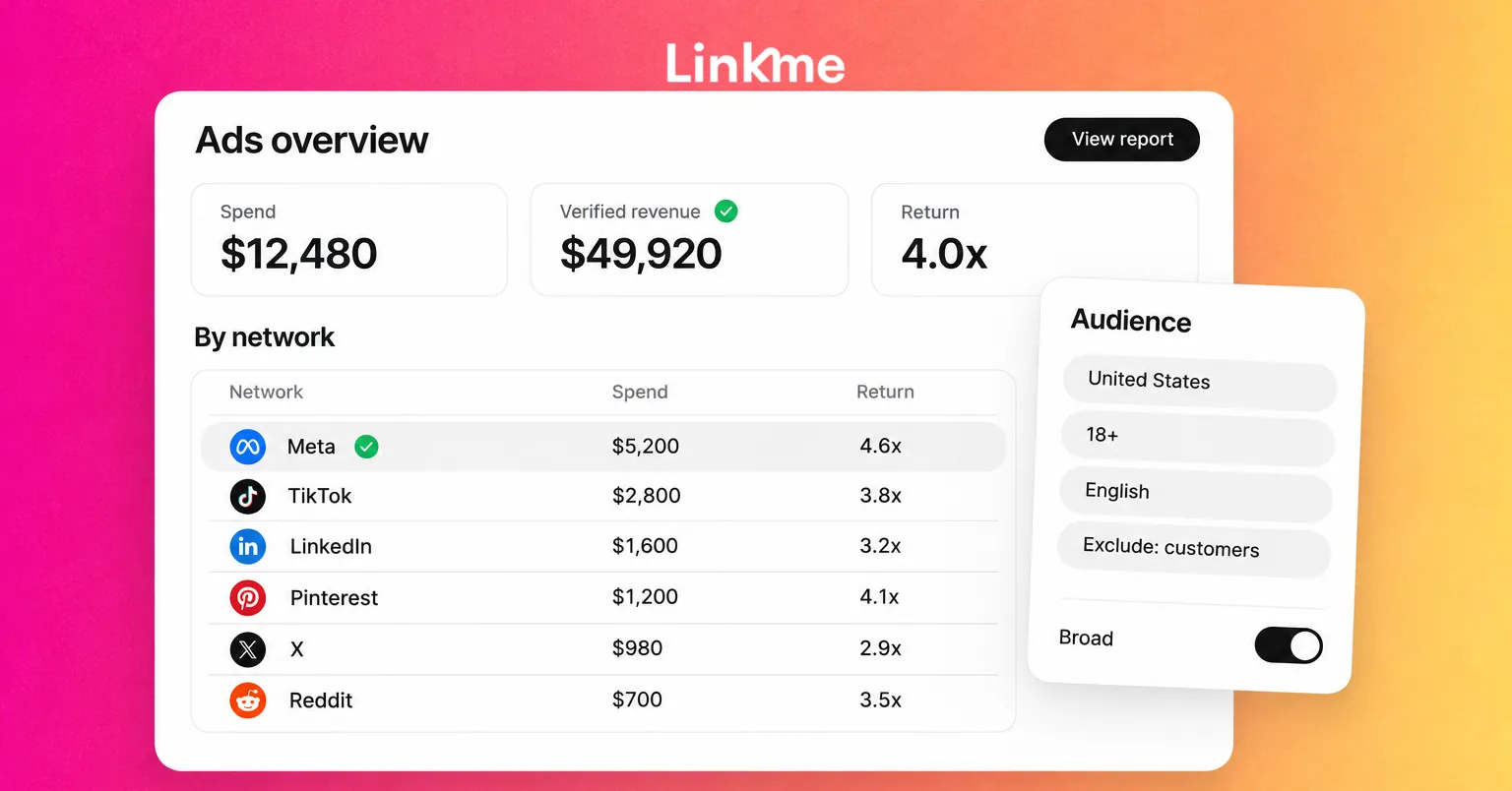
With Linkme, a business team can run its ad campaigns on Meta, Google, TikTok, LinkedIn, X, Pinterest, Reddit and ChatGPT from one place. The owner connects each ad account through the network’s own sign in, and the team builds a new ad or boosts a post already published. Each network supports its own set of actions; ChatGPT ads, for example, target by country only and cannot boost a post.
Anything that needs sign-off waits for it: admins and managers need approval to launch unless the owner lets them launch without it up to a monthly limit. The Ads overview shows spend, results and return for each network side by side. Verified revenue counts sales on your Linkme pages from people who clicked an ad launched from Linkme, and the network’s own reported return shows separately. The Ads, Team & Security page covers roles and limits.
Frequently asked questions
What is social media targeting?
It is the set of choices that tell an ad network who should see an ad: location, language, age, your own audience lists, interests or job attributes, and exclusions. On most networks today, some of those choices are firm limits and others are suggestions the delivery system can expand.
Is broad targeting better than detailed targeting?
Often, but not always. Broad audiences give the network more room to find buyers and are recommended by several networks as a starting point. Narrow targeting is still right for role-based B2B offers, local businesses, retargeting and exclusions.
What are custom audiences?
Audiences built from your own data, such as customer lists, website visitors or people who engaged with your content. They need permission to use, have minimum match sizes, and can seed lookalike audiences where a network offers them.
Can I use the same targeting on every network?
No. Each network offers different options, and some are very limited. ChatGPT ads, for example, target by country only. Set up each network on its own terms and compare them on results.
Good targeting today is less about finding the perfect audience settings and more about clear limits, honest use of your own data and creative that speaks to one kind of person. If your team runs ads on several networks, book a demo to see how campaigns, approvals and Verified revenue work in Linkme.