Essential Tools for Influencers: How to Build Your Creator Tool Stack
The seven jobs every influencer's tool stack has to cover, which of them Linkme handles in one login, and what you should still keep in a separate app.
On this page
- Key takeaways
- The seven jobs in an influencer tool stack
- 1. A page that does more than list links
- 2. A scheduler that posts everywhere
- 3. DM automation for comment keywords
- 4. An inbox you actually check
- 5. A shop on the same page
- 6. Analytics that separate reach from results
- 7. Being found by brands
- Where AI fits
- How to trim your stack
- Frequently asked questions
Most influencers do not lack tools. They have too many: one app for the bio link, another for scheduling, a third for comment replies, a store somewhere else and a spreadsheet of brand contacts. Each one has its own login, its own bill and its own blind spots.
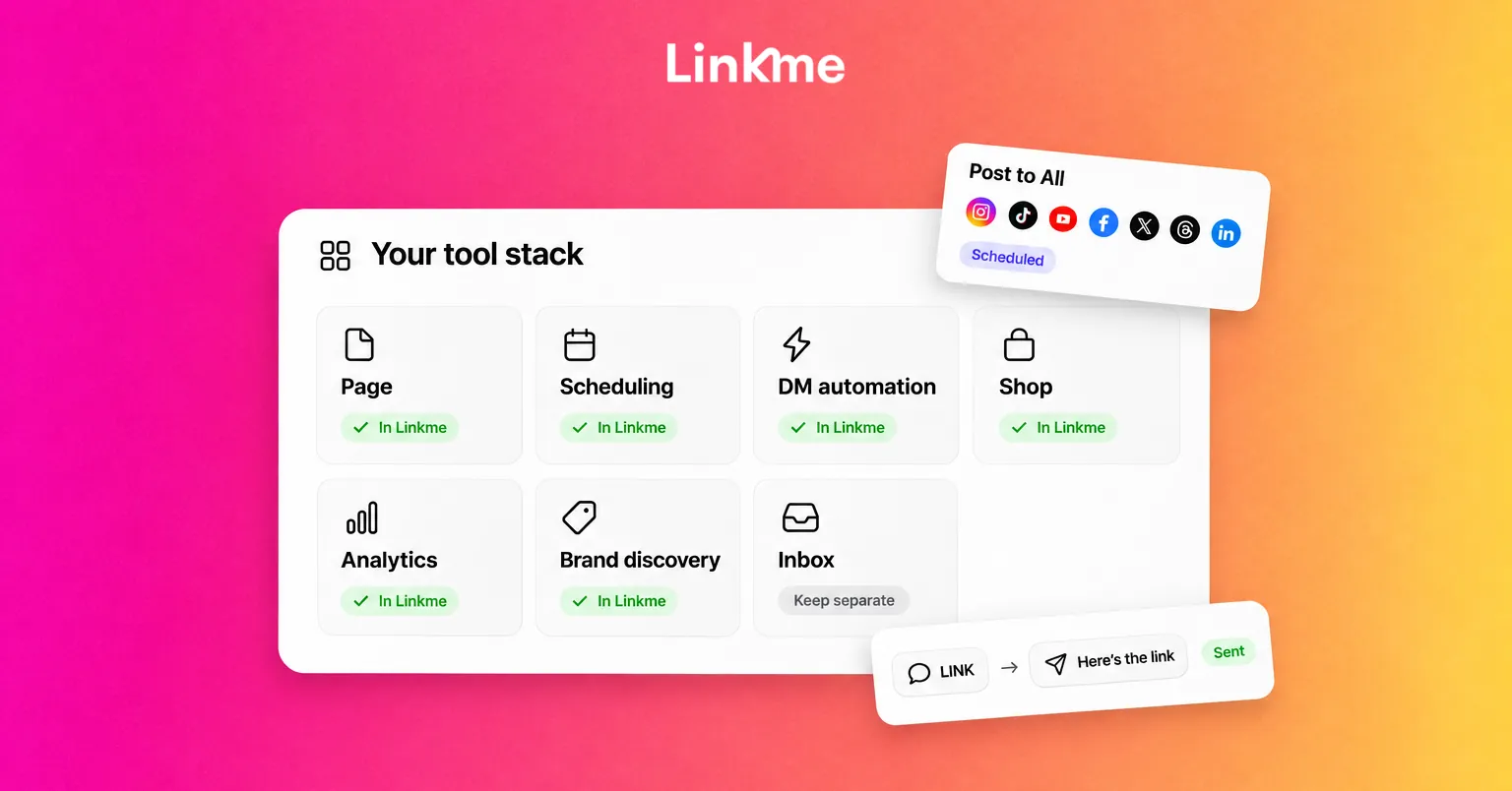
The essential tools for influencers cover seven jobs: a page your bio points to, a scheduler, DM automation, an inbox, a shop, analytics and a way for brands to find you. This guide explains what each job needs, which of them Linkme handles in one login and which you should still keep in a separate app.
The seven jobs in an influencer tool stack
| Job | What the tool must do | Covered by Linkme for creators? |
|---|---|---|
| Your page | One link with your channels, offers and an email sign up | Yes |
| Scheduling | Post one video to several networks, now or later | Yes, to seven networks |
| DM automation | Send a link when someone comments a keyword | Yes, on Instagram and Facebook Pages |
| Inbox | Read and answer comments and DMs in one place | No, keep the native apps or a business plan |
| Shop | Sell merch, downloads and courses, take tips | Yes |
| Analytics | Know what drives clicks and sales | Page analytics yes; keep native insights for reach |
| Brand discovery | Be found by brands that fit | Brands search creators on Linkme through Link |
The sections below go through each job in turn.
1. A page that does more than list links
Your link in bio is the one place every platform can send people. Treat it as a home base, not a directory. The layout Linkme suggests for creators and athletes is an email sign up first, then your brands, your channels, your latest videos and anything you sell.
Features worth looking for in any page tool:
- An email sign up so followers become contacts you own. On Linkme, the Connect with button and forms are on Plus, and Leads with email campaigns are on Pro.
- Total followers. From Plus, your page shows your followers across every connected network as one number, next to a verification badge. It gives a brand a quick read on your reach across networks.
- Scheduled links. A drop, a ticket link or a launch goes live at a set time with a countdown on the page. Link scheduling is on Plus and Pro.
- A QR code for merch tags, events and screens. Every Linkme page has one, and it always opens the live page.
2. A scheduler that posts everywhere
Posting the same video by hand to seven apps eats an evening. A scheduler should take one upload, let you adjust the caption for each network and show whether each post went out.
Linkme’s Post to All publishes to Instagram, TikTok, YouTube, Facebook, X, Threads and LinkedIn, now or on a schedule. Free includes 10 posts in total, Plus and Pro are unlimited, and Pro connects up to 10 accounts per platform, which helps if you run a second channel or a brand account. Captions follow each platform’s limits, for example 280 characters on X and 2,200 on Instagram.
3. DM automation for comment keywords
“Comment LINK and I’ll send it to you” works because it moves people into DMs, where links are clickable. Doing it by hand stops working after a few hundred comments.
Linkme DM automations watch the posts you choose and, when a comment matches your keyword or on any comment, post a public reply and send a DM with your link. They run on Instagram business or creator accounts and on Facebook Pages, on every plan including Free. Pro has unlimited automations and up to 100,000 contacts a month. Set a reply delay so responses read like a person; Linkme suggests 30 to 90 seconds.
4. An inbox you actually check
This is the job to keep elsewhere for most creators. Linkme’s Social Inbox is part of Linkme Business and is not on the creator plans. Use each network’s own inbox, or a dedicated inbox tool if your team answers messages for you. DM automations cut the volume, but brand emails and personal replies still need a person.
5. A shop on the same page
Selling from the page your audience already visits removes a step. Linkme sells print on demand merch and takes tips from the free plan, and adds digital products and courses on Plus. Checkout happens on your page through Stripe, with Apple Pay, Google Pay or a card, and payouts go to your bank. Linkme takes a platform fee set by your plan, plus Stripe processing.
If you already sell on your own store, you can list those products and send buyers to your existing checkout instead.
6. Analytics that separate reach from results
Two kinds of numbers matter, and no single tool gives you both.
- Native insights in Instagram, TikTok and YouTube show reach, watch time and follower growth. Keep using them.
- Page analytics show what happened after someone tapped your link. Linkme tracks profile views, link clicks, traffic sources, countries and cities, and sales. Free covers visits and clicks, Plus adds the deeper views and Pro adds real-time activity.
Compare them once a week: which post had reach, and which one actually drove clicks or sales.
7. Being found by brands
Brand deals usually start with a brand finding you, so your page acts as a live media kit. Keep it current with your niche in the bio, your total followers, your best recent videos and a contact option.
Linkme Business includes a creator marketplace where brands tell Link, Linkme’s AI Social Media Manager, who they want to reach. Link searches the creators on Linkme, matches them by size, industry and niche, looks at what each one actually posts and sends the brief to the creators the brand approves. A clear, active page helps you show up as a fit. It does not guarantee offers.
Keep these outside the stack
Whatever you use, a few jobs need their own tools:
- Contracts and invoices. Agree deliverables, usage rights and payment terms in writing.
- Ad disclosure. The FTC’s guide for influencers says to disclose any financial, employment, personal or family relationship with a brand, place the disclosure with the endorsement, and not rely on a platform’s paid partnership label alone.
- Editing apps for video and photos.
- A scheduling tool if you sell calls or coaching. Linkme has no booking feature, so link to your calendar from your page.
- Account security. Turn on two-factor authentication on every network.
Where AI fits
On Pro, Link can draft posts, images and video, edit your page and schedule content after you approve it. Nothing goes live until you press Approve. It is useful for the repetitive parts, such as captions for seven networks, while you keep the voice.
How to trim your stack
- List every app you pay for or log into weekly.
- Map each one to the seven jobs above.
- Mark overlaps, such as two link pages or a scheduler you no longer use.
- Move one job at a time and keep the old tool until scheduled posts have gone out.
- Review again in six months.
Frequently asked questions
What tools does a new influencer need?
Start with three: a link in bio page with an email sign up, a way to schedule posts to the networks you use, and each network’s native insights. Add DM automation once comments asking for links become hard to answer, and a shop when you have something to sell.
Is there one app that does everything for influencers?
Not completely. Linkme covers the page, posting to seven networks, DM automations, a shop and page analytics in one login. You will still want native insights, an editing app, contracts and invoicing, and an inbox for replies.
Do influencers need a social media scheduler?
If you post to more than two networks, yes. A scheduler saves time, keeps posting consistent while you travel or shoot, and shows which posts failed so you can retry them.
How do brands find influencers to work with?
Brands search on the networks, use agencies and use creator search tools. On Linkme, brands using Linkme Business ask Link to find creators who fit, so an up-to-date page with your niche, audience and recent work helps.
The right stack is the smallest one that covers every job. See how creators run their page, posts and sales on Linkme, then keep the few specialist tools that still earn their place.


