Link in Bio for Musicians: Smart Links, Tour Dates and Merch
How to set up a musician's link in bio that turns new listeners into streams, ticket sales, merch orders and email sign ups, and how to use city data to plan tours.
On this page
Someone hears your song in a TikTok, taps your profile and lands on your bio link. In the next few seconds they decide whether to stream it, follow you or leave. If the link opens a long list of buttons with no clear first step, many leave.
A good link in bio for musicians does four jobs in order: get a new listener to your track on the app they already use, show where you are playing, sell merch and capture an email so you can reach them on release day. This guide shows how to set up each part and how to use the data from your page to decide where to play next.
What a musician landing page should hold
Keep the page short and ordered by what you want a new fan to do first.
| Section | Why it is there | Linkme block |
|---|---|---|
| Latest release | Turns a curious listener into a stream | Music Smart Link |
| Tour dates | Sells tickets while interest is high | Events |
| Email sign up | Gives you a direct line for the next release | Connect with or a form |
| Merch | Income from fans who cannot make a show | Merch and products |
| Videos | Lets people keep listening on the page | Video feeds from Instagram, TikTok and YouTube |
| Socials | Lets fans follow you where they spend time | Platform links |
Sections can be switched on or off and dragged into any order, so you can move tour dates to the top during a run and put the release first in launch week.
Use a smart link for music
Fans listen in different apps. Sending everyone to one streaming service loses the people who use another. A smart link for music shows the same song on every service and lets the fan choose.
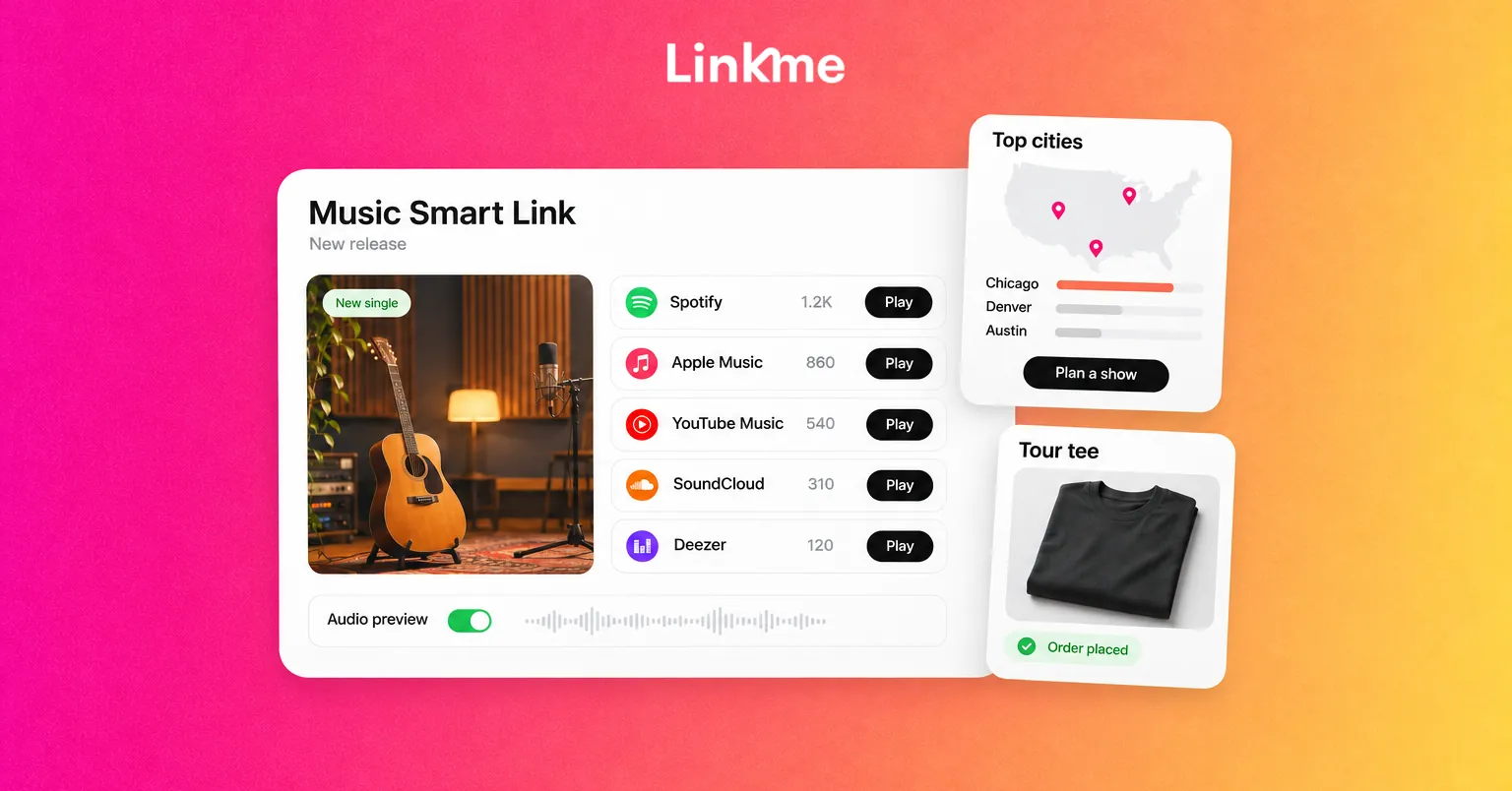
Linkme’s Music Smart Link works from one URL. In Edit Profile, paste a song or album link from a supported service, and Linkme finds the same track across nine music services: Spotify, Apple Music, YouTube Music, SoundCloud, Amazon Music, Tidal, Deezer, Audiomack and Pandora. Fans tap their preferred service and start listening. You can turn on an audio preview so people hear a few seconds before they tap.
Make release day work
- Swap the link on release day. Replace the previous single so the page always leads with what you are promoting now.
- Schedule it. On Plus and Pro, the link scheduler gives any link a start and end time, with a countdown on the page. Set the new release to go live at the moment it drops.
- Make it stand out. Use the big link size, and on Pro add an animation such as Shine.
- Check the split. Your analytics count clicks per service, which tells you where your listeners actually stream.
Put tour dates and events on the page
A post announcing a tour gets buried in a day. Dates on your page stay findable for the whole run.
With Tickets and events, you add each show with its name, date, venue and description, and attach the ticket link from any platform, such as Eventbrite, Dice or AXS. Events sort themselves by date on your profile. When a show sells out or passes, update or remove it so fans do not tap into a dead checkout.
Two ways to push ticket sales from social:
- Post the announcement everywhere at once. Post to All sends one video to Instagram, TikTok, YouTube, Facebook, X, Threads and LinkedIn, now or on a schedule.
- Answer comments with the ticket link. A DM automation on Instagram or a Facebook Page can send the link to anyone who comments a keyword such as TICKETS under the announcement. Say the keyword in the caption.
Sell merch without holding stock
Merch is often how fans who live far from your shows support you. Linkme’s print on demand merch lets you design products with your own artwork or the built in AI design tool, set your price above the base cost and publish. Each order is printed and shipped when it is placed, so you hold no inventory. Merch is available on every plan, with a lower fee on Plus and Pro.
If you already sell merch on your own store, add those products and link them to your existing checkout instead. On Plus and Pro you can also sell digital products, such as sample packs, stems, sheet music or a live recording, delivered the moment someone pays. Tips are on every plan.
Build a musician email list
Followers on a social network can be reached only when the algorithm decides. An email list reaches people directly on release day and when tickets go on sale.
- Add a sign up near the top. The Connect with button adds a one-tap email capture under your name, and a form can also ask for a phone number or city. Forms are on Plus and Pro.
- Give a reason. “Get tour dates in your city first” works better than “Join my newsletter.”
- Send from the same place. On Pro, everyone who signs up lands in Leads, where you can send email campaigns and see opens and clicks, or export a CSV.
- Only email people who agreed. Contacts you add by hand are marked as not opted in. Keep the list clean so your emails keep reaching inboxes.
A simple rhythm: one email per release, one per tour announcement and one when tickets go on sale in a region.
Use city-level analytics to plan tours
Streaming dashboards tell you where people listen. Your page tells you where people are motivated enough to click.
Linkme’s geographic analytics rank the countries and cities your visitors come from, and each link shows its own top countries and top cities. An hours view shows when your page is busiest. Free covers visits and clicks, and these deeper views start on Plus. Use them to:
- Spot demand. A city that keeps tapping your ticket and streaming links but has no show is worth raising with your agent or a local promoter.
- Time announcements. Post when your page is busiest so the news lands while fans are online.
- Target emails. If your form asks for a city, pick the contacts who listed that city and send them the show announcement first.
- Check results. After a show announcement, compare clicks on the ticket link from that city with the week before.
These numbers come from your Linkme page only, so read them alongside your streaming and social insights rather than instead of them.
Get the page in front of fans
- Put the same link in every bio and on every story link sticker.
- Show the page’s QR code on screen between songs, on the merch table and on posters. It always opens the live page, so you can update it after printing.
- Mention one specific thing in your captions, such as “new single and tour dates at the link in bio,” rather than a generic “link in bio.”
Frequently asked questions
What should a musician put in their link in bio?
Lead with your current release as a smart link, then tour dates with ticket links, an email sign up, merch and your social channels. Keep it short and reorder it for each campaign, such as release week or a tour run.
What is a smart link for music?
A smart link is one URL that opens your song or album on whichever streaming service the fan prefers. On Linkme, you paste one song or album link and it finds the same track across nine music services, with an optional audio preview and clicks counted per service.
How do musicians grow an email list from social media?
Put an email sign up near the top of your link in bio page, give fans a specific reason to join, such as early ticket access, and mention it in captions and on stage. Then email consistently, but only at moments that matter.
Can I see which cities my fans are in?
Yes, from your page analytics. Linkme ranks countries and cities by visits and clicks on Plus and Pro, and each link shows its own top cities, which helps with tour routing and local announcements.
Your music gets people curious. Your page decides whether that curiosity turns into a stream, a ticket or an email address. Set up your Music Smart Link first, then add your dates and sign up around it.