Linkme Supported Platforms: Every Network and Tool It Connects To
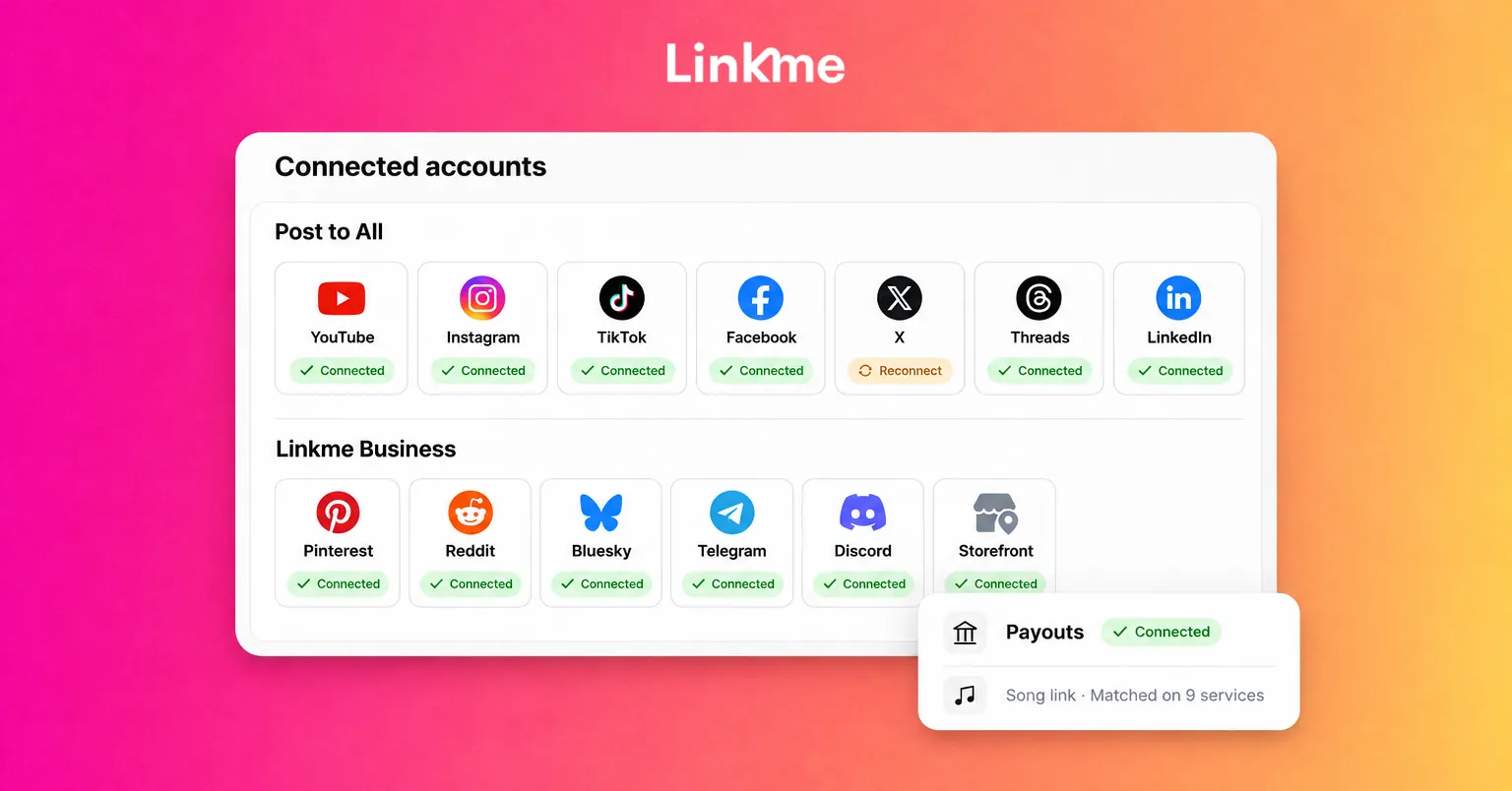
Every platform Linkme connects to today: seven publishing networks, 13 on Linkme Business, Instagram and Facebook replies, Stripe payouts, nine music services and sign-in.
On this page
- Key takeaways
- Linkme supported platforms at a glance
- Publishing: the networks Post to All reaches
- Replies: Instagram and Facebook comments and DMs
- Payments: Stripe
- Music: nine streaming services
- Sign-in: Google, Apple or email
- Other connections on your page
- What is not on the list
- Frequently asked questions
Linkme supported platforms fall into five groups: the social networks you publish to, the accounts whose comments and DMs Linkme answers, the payment service behind your sales, the music services a song link matches, and the accounts you sign in with. Post to All publishes to seven networks on the creator plans and 13 on Linkme Business. This page lists every one of them, what Linkme does with each and where the limits are, so you can check your setup before you connect anything.
Linkme supported platforms at a glance
| Job | Platforms | Where it lives in Linkme |
|---|---|---|
| Publish posts | YouTube, Instagram, TikTok, Facebook, X, Threads, LinkedIn | Post to All |
| Publish posts (Linkme Business) | The seven above plus Pinterest, Reddit, Bluesky, Telegram, Discord, Google Business Profile | Post to All |
| Reply to comments and DMs | Instagram, Facebook | DM Automations, Social Inbox |
| Get paid | Stripe | Sell & Monetize |
| Match a song | Spotify, Apple Music, YouTube Music, SoundCloud, Amazon Music, Tidal, Deezer, Audiomack, Pandora | Smart music link |
| Sign up or log in | Google, Apple, email | Account |
The official list lives on the Linkme integrations page, which is read from the Linkme app. If something here and that page ever differ, the integrations page is current.
Publishing: the networks Post to All reaches
Seven networks on the creator plans
Post to All takes one upload and one caption, or a caption per network, checks it against each network’s limits and publishes it to every account you pick, now or on a schedule. Each network accepts its own formats:
| Network | What you can post | Caption limit |
|---|---|---|
| YouTube | Video, with a title and Public, Unlisted or Private | 5,000 characters |
| Image, carousel up to 10, or video (Reels and feed) | 2,200 characters | |
| TikTok | Image, carousel up to 35, or video, with Who can watch, Duet and Stitch | 2,200 characters |
| Video, image, carousel up to 10, or text | 2,200 characters | |
| X | Video, image, carousel up to 4, or text | 280 characters |
| Threads | Video, image, carousel up to 20, or text | 500 characters |
| Video, image, carousel up to 20, or text | 3,000 characters |
Every plan takes videos up to 3 minutes and uploads up to 300 MB.
Thirteen networks on Linkme Business
Linkme Business adds six destinations: Pinterest, Reddit, Bluesky, Telegram, Discord and Google Business Profile. That brings community channels such as Discord and Telegram, and Google Business Profile for local businesses, into the same composer and calendar as your social posts.
How connecting works
Open Post to and press Connect on a network. You sign in to that network once and the account appears for every post after that. If a network signs you out, the account shows Reconnect; reconnect it before you include it in a post, and existing posts are not affected.
How many accounts you can connect depends on the plan. Free and Plus connect one account per network, Linkme Pro connects up to 10, and on Linkme Business your package sets the number.
If a post misses one network, it is marked Partially posted and shows which one failed. Retry failed platforms sends it again to just those networks. For a wider look at adapting one post for several networks, see how to cross-post on social media.
Replies: Instagram and Facebook comments and DMs
Two Linkme features connect to your conversations, and both work on Instagram and Facebook.
DM Automations reply for you. Pick the posts, set a keyword or answer every comment, and Linkme replies and sends your link by DM. On Instagram this needs an Instagram Business account; on Facebook it covers comments and Messenger DMs on the Pages you manage.
Social Inbox puts the messages and comments from a connected Instagram professional account or Facebook Page in one list, with the post behind each comment, internal notes and saved replies. The Linkme Business inbox adds assignment and Google reviews to the same list.
Payments: Stripe
Products, merch, courses and tips check out through Stripe on your Linkme page. Buyers pay with Apple Pay, Google Pay or a card, and Stripe pays your earnings out to your bank. Each Linkme page connects its own Stripe payout account, so every creator, brand or location is paid separately. Linkme takes a platform fee set by your plan, with Stripe processing on top, and both are shown before you publish.
Music: nine streaming services
Paste a song or album link from any of these services and Linkme finds the same track on the others, so fans can stream wherever they listen:
- Spotify
- Apple Music
- YouTube Music
- SoundCloud
- Amazon Music
- Tidal
- Deezer
- Audiomack
- Pandora
The smart music link guide covers setup, the optional audio preview and per-platform click tracking.
Sign-in: Google, Apple or email
You can create a Linkme account or log in with Google, Apple or your email address. Your social accounts are connected separately: in Post to for publishing, and in DM Automations and the Social Inbox for replies.
Other connections on your page
A few more connections show up on the page itself rather than in the publishing tools:
- Video feeds from Instagram, TikTok and YouTube.
- Google Reviews as a section you can switch on.
- Events synced from Bandsintown, each with its ticket link.
- Ad pixels: your Meta Pixel ID, TikTok Pixel ID and Google Analytics Measurement ID, added once so those tools see every visit.
- Total followers, on Plus and Pro, which adds up the followers on every account you connect and shows one number on your profile.
Linkme’s Ads, Team & Security tools also connect ad accounts. The networks listed there are Meta, Google Ads, TikTok, Pinterest, X, Reddit, LinkedIn and ChatGPT, and each supports its own set of actions.
What is not on the list
Snapchat is not available for posting on the web, so keep publishing there in the Snapchat app. For any site Linkme does not list, a featured link on your page accepts any web address, and every link shows its own click count in your analytics.
Frequently asked questions
Which platforms can Linkme post to?
On the creator plans, Post to All publishes to YouTube, Instagram, TikTok, Facebook, X, Threads and LinkedIn. Linkme Business publishes to 13: those seven plus Pinterest, Reddit, Bluesky, Telegram, Discord and Google Business Profile.
Does Linkme post to Snapchat?
No. Snapchat is not available for posting on the web. You can still add your Snapchat profile to your Linkme page as a link.
Which platforms do DM automations and the Social Inbox cover?
Both cover Instagram and Facebook. DM automations reply to comments and DMs on an Instagram Business account and on Facebook Pages you manage. The Social Inbox brings in messages and comments from a connected Instagram professional account or Facebook Page.
How do I get paid on Linkme?
Through Stripe. Connect a Stripe payout account once, and tips, shop sales and course revenue are paid out to your bank on the schedule Stripe sets for your country.
If you are deciding which networks to add next, start with the ones your audience already uses, connect them once and let Post to All handle the rest of the publishing.