How to Adapt Content for Each Platform Before You Share It
Keep the idea, change the packaging. What to adjust on each network (crop, caption length, first line, hashtags, links and timing), with a worked example and a checklist.
On this page
To adapt content for each platform, keep the idea and the core media the same, then change what each network judges differently: the crop, the caption length, the opening line, the hashtags, where the link goes and when it posts. Done well, it takes minutes per post, not a new production. This guide walks through what to change on each network, with a worked example and a short checklist.
Why one identical post underperforms
Posting the same file and caption everywhere is fast, and it is better than not posting. But each network rewards different things. A caption written for LinkedIn reads as a wall of text on X, which cuts it off at 280 characters. A landscape video looks small in a vertical feed. A row of hashtags that suits Instagram looks out of place on LinkedIn. A “link in bio” note makes no sense on a network where the link can sit in the post.
Adapting fixes these mismatches without changing the message. If you want the broader workflow for publishing everywhere, read how to cross-post on social media. This guide focuses on the adapting step.
What to change for each network
Format and crop
Shoot or design with the tallest format you need, then crop down.
- Short vertical video (Reels, TikTok, YouTube Shorts) fills the screen at 9:16. Keep text and faces away from the edges, where the interface covers them.
- Feed images on Instagram, Facebook, LinkedIn and Threads usually work best in portrait or square, which take up more of the screen than landscape.
- YouTube long-form is landscape. If your source is vertical, post it as a Short instead.
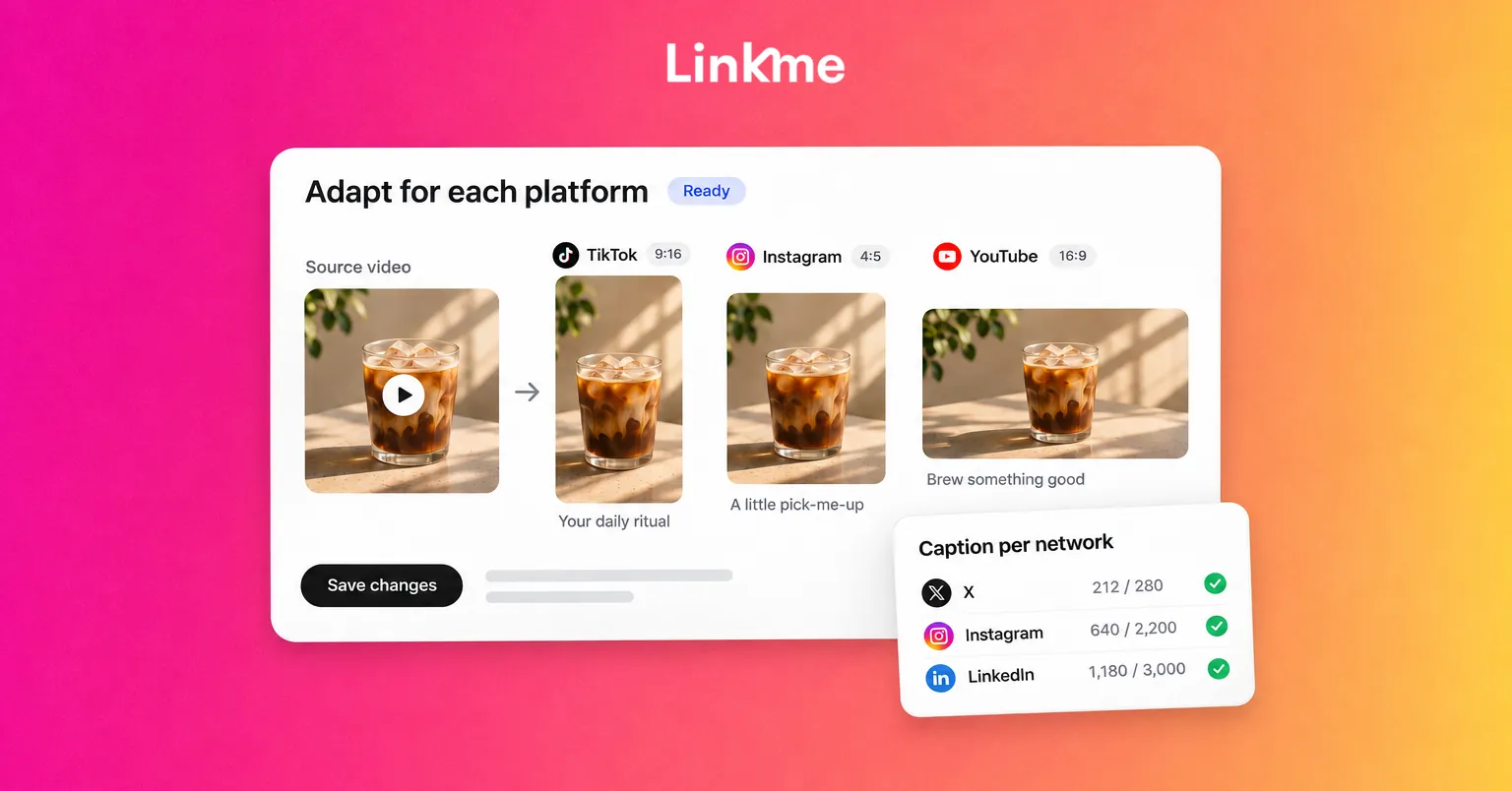
- Carousels have different maximums. In Linkme’s composer: Instagram and Facebook take up to 10 items, Threads and LinkedIn up to 20, TikTok up to 35 and X up to 4. Put the strongest four first so the X version still works.
Caption length
Here are the caption limits per network as Linkme’s composer checks them:
| Network | Caption limit | What that means in practice |
|---|---|---|
| X | 280 characters | One sharp sentence and the link |
| Threads | 500 characters | A short post with a question to invite replies |
| 2,200 characters | Room for a story, but the first line carries it | |
| TikTok | 2,200 characters | Short; the video does the work |
| 2,200 characters | Conversational, with the link in the post | |
| 3,000 characters | A short argument or lesson with line breaks | |
| YouTube | 5,000 characters | A full description with links and chapters |
X Premium subscribers can publish longer posts on X itself, up to 25,000 characters according to X’s help center. Most readers still see a short preview, so the first 280 characters should stand alone.
The first line
Every network truncates captions, so the opening sentence is the one that counts. Write a different hook for each audience:
- Instagram and TikTok: a reason to keep watching. “The 3-minute fix for the most common booking mistake.”
- LinkedIn: a claim or a result. “We cut no-shows by changing one line in our confirmation message.”
- X and Threads: the point itself, or a question that invites a reply.
- YouTube: a description of what the viewer will learn, using the words they would search.
Hashtags
Use a few specific hashtags rather than a long list. Instagram limits how many hashtags a post can carry, so choose the ones that describe the topic and the audience. On TikTok, a couple of relevant tags help. On LinkedIn, one to three is plenty. On X and Threads, many accounts use none.
Links
Where a link is clickable varies:
- Instagram: links in captions are not clickable. Point to your bio link, or use a comment keyword that sends the link by DM.
- TikTok: the profile link is the main route.
- X, Threads, LinkedIn and Facebook: the link can sit in the post itself.
- YouTube: links in long-form descriptions are clickable; links in Shorts descriptions and comments are not.
Timing
Your audience on each network may be online at different times. Check each network’s own analytics for when your followers are active, and stagger posts if the windows differ. A weekday lunchtime that works on LinkedIn may be a quiet hour on TikTok.
A worked example: one announcement, seven versions
Say a fitness studio is launching a Saturday morning class. The source material is a 40-second vertical video and three photos.
- Instagram: the video as a Reel. First line: “New Saturday class, and it’s built for beginners.” Three hashtags. “Book from the link in our bio.”
- TikTok: the same video, with on-screen text “Saturday 9 AM, beginners welcome.” A one-line caption.
- YouTube: the video as a Short with a searchable title, “Beginner Saturday workout class.” No link in the description, since it would not be clickable.
- Facebook: the photos as a carousel with the booking link and the address.
- X: “New beginner class every Saturday at 9 AM. First session free. Book here:” plus the link.
- Threads: one photo and a question: “What stops you from trying a group class?”
- LinkedIn: a short post on why the studio added a beginner slot, aimed at local employers who offer wellness benefits.
The message is identical. The packaging is not.
Adapt in one composer, not seven apps
Adapting by hand often means uploading the same file to seven apps and editing seven captions. That is where most people give up and post one version everywhere.
Linkme Post to All keeps it in one place. Upload a video, an image or a carousel once, write one caption for all networks, then open a network’s tab and give it a caption of its own where it needs one. Each limit is checked as you type, from 280 characters on X to 5,000 on YouTube. You can frame photos square, portrait or landscape and see how many photos each network takes in a carousel. Then publish now or schedule a date and time, and see a status for each network, with a retry for any that missed.
Post to All reaches YouTube, Instagram, TikTok, Facebook, X, Threads and LinkedIn on the web; Linkme Business adds Pinterest, Reddit, Bluesky, Telegram, Discord and Google Business Profile. The Post to All guide covers the steps.
A checklist before you schedule
- Is the crop right for every network in the post?
- Does each first line work on its own if the rest is cut off?
- Does the X caption fit in 280 characters with the link?
- Is the link placed where it is clickable on each network?
- Are the hashtags few and specific?
- Are the times right for each audience?
- After publishing, did every network post, and do any need a retry?
Frequently asked questions
What is the difference between adapting and repurposing content?
Adapting changes the packaging of the same post for each network: crop, caption and links. Repurposing turns one piece into a different format, such as cutting a long video into clips or turning a webinar into a carousel. Most teams do both.
Should I post the same content on every platform?
You can post the same idea and media, but adjust the caption, crop and link placement for each network. An identical caption pasted everywhere is usually too long for X and too short for LinkedIn.
What are the caption character limits by platform?
In Linkme’s composer, X allows 280 characters, Threads 500, Instagram, TikTok and Facebook 2,200, LinkedIn 3,000 and YouTube 5,000. X Premium subscribers can post longer text on X itself.
How do I write a caption per platform without doubling my work?
Write the core message once, then change only the first line, the length and the link placement for each network. Doing it in one composer with a tab per network keeps it to a few minutes.
Pick your next post, write the core message in one sentence, and adapt it for the two networks where your audience is most active. Then add the rest once the habit sticks.