Social Commerce: How to Sell on Social Media, Step by Step
How social commerce works in practice: a shoppable link in bio, comment keywords that send a product link by DM, presales that deliver on release day and a buyer list you own.
On this page
Social commerce is selling where your audience already spends time: a post or video sparks interest, and the buyer gets from that moment to a checkout in a tap or two. In practice that means shoppable posts that point somewhere useful, comments and DMs that answer with a product link, a shop people can pay in from their phone, and a way to stay in touch after the sale.
This guide covers how to set up each part, with examples you can adapt for physical products, digital downloads, merch and presales.
How social commerce works: four routes to a sale
Most businesses and creators who sell on social media use more than one of these routes.
| Route | How it works | Works well for |
|---|---|---|
| In-app shop | The network hosts the product listing and sometimes the checkout. | Brands that meet the network’s seller rules in the countries and categories it supports. |
| Shoppable link in bio | Posts send people to one page with your products and a checkout. | Creators and small brands selling across several networks. |
| DM to checkout | Someone comments or messages a keyword and gets the product link privately. | Launches, limited items and questions like “where can I buy this?” |
| Partner and creator selling | Someone else’s audience sees your product, through their content or your ads made from it. | Reaching new buyers who do not follow you yet. |
In-app shops depend on each network’s current seller programs, which change by country and category, so check the platform’s own seller help pages before you plan around one. The other three routes work on any network that lets you share a link.
Build a shoppable link in bio
Your link in bio is often the first place a social shopper goes. Treat it as a storefront, not a list of links.
What a good social storefront needs
- Products at the top. If you are mid-launch, the launch goes first.
- A checkout that works on a phone. Apple Pay and Google Pay save typing a card number on a small screen.
- Clear prices and delivery details before the buyer commits.
- A way out of in-app browsers. Inside the Instagram or Threads browser people are signed out of everything, which can break a checkout.
How this works on Linkme
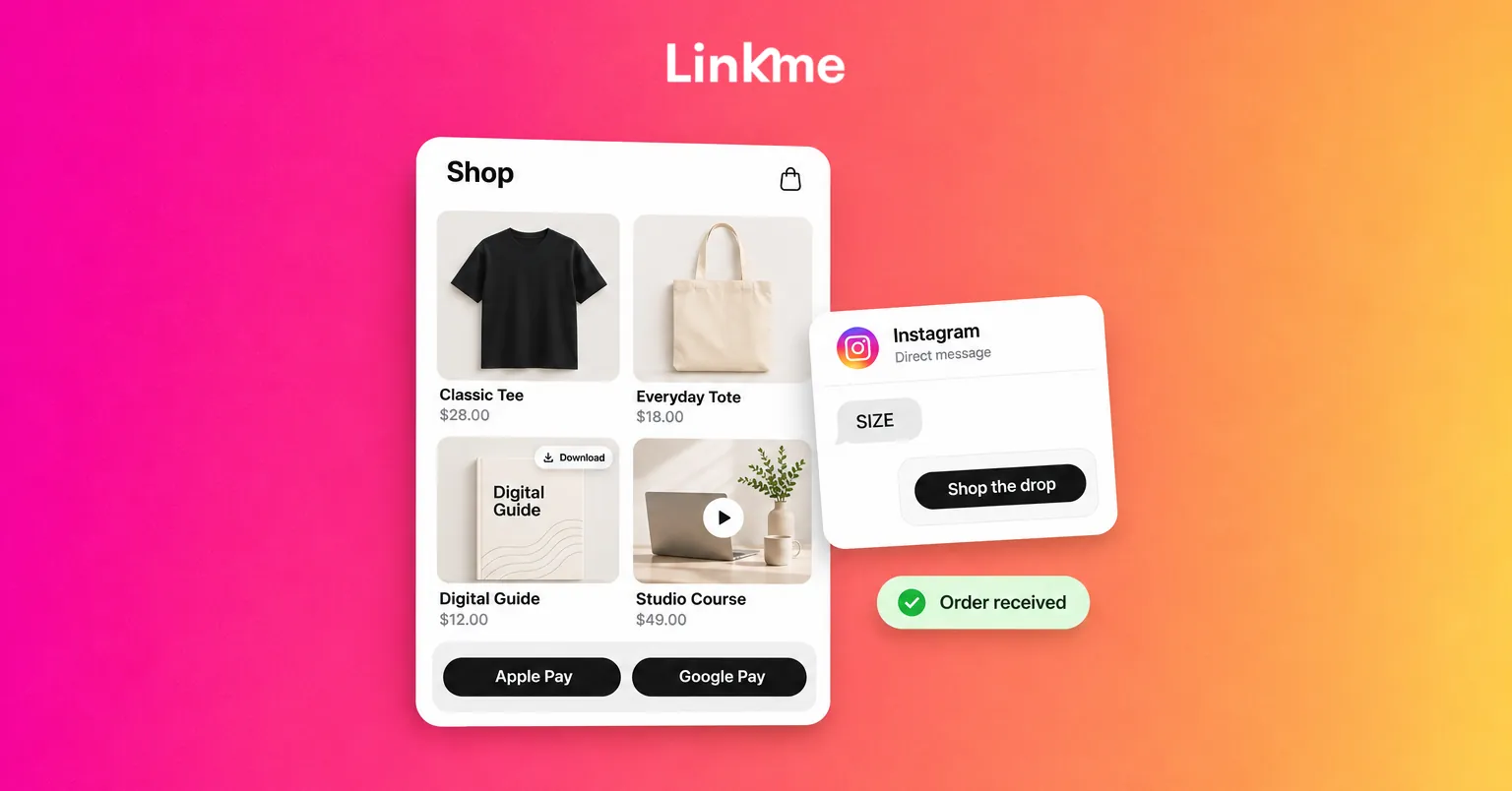
With Linkme’s Sell & Monetize tools, products sit on your Linkme page and together at link.me/yourname/shop. Buyers choose a size, add items to their bag and pay with Apple Pay, Google Pay or a card, with shipping and tax worked out at checkout. Payments run through Stripe and are paid out to the bank you connect.
You can sell:
- Digital downloads with instant delivery, such as guides, presets and templates.
- Pay to unlock content, which shows a blurred preview on your page until someone pays.
- Print on demand merch. Linkme prints and ships each order, so you hold no stock.
- Courses with video lessons and downloadable materials, sold for a one-time price.
- Tips from fans who want to support you directly.
- External products you already sell elsewhere, listed with a title, price and link to your own store.
Fees are shown before you publish: a Linkme platform fee set by your plan, plus Stripe’s processing fee. Each order in Sales shows the split. For Instagram and Threads traffic, the Deeplink Banner (on Pro and every Business seat) adds a button that opens your page in Safari or Chrome. The sales guide shows which plan includes which product type.
Turn comments and DMs into checkouts
“Link?” “How much?” “Do you ship to Canada?” Comments and DMs like these are buying signals. Answering them quickly is one of the most reliable ways to sell on social media.
Use a keyword that sends the product link
Ask people to comment a word, for example “comment SIZE and we’ll DM you the size guide and shop link.” With Linkme DM Automations, anyone who comments that keyword on Instagram or a Facebook Page gets a private DM with the link, and Linkme can post a public reply under the comment too. You can also answer every comment on a post. Automations can reply to DMs as well, and on Instagram a reply can carry up to three links as buttons, so one message can offer “Shop the drop”, “Size guide” and “Shipping info.”
Each automation shows its activations, clicks and click-through rate, so you can see which keyword actually sends people to the shop.
Hand the hard questions to a person
Automation handles the common question. A refund, a custom order or an unhappy buyer needs a person. In Linkme’s Social Inbox you can pause the automation for one conversation, answer it yourself and resume it, with saved replies for shipping and returns ready to insert.
Run presales that deliver on release day
A presale turns attention into revenue before the product exists, and it shows you how much demand there is before you commit to stock.
- Announce the date with a short video and a clear “available to order now” message.
- Take payment now. On Linkme, schedule the product’s release and buyers can pay straight away. The product reaches them automatically on release day, and Linkme can email them when it releases.
- Repeat the call to action in comments and DMs as the date gets closer.
- Put a time limit on the offer. With the Link Scheduler (Plus, Pro and Business), a link can go live at a set time, count down on your page and come off when the window closes.
- Deliver and follow up. Ask buyers for a photo or review you can reshare.
Keep the buyer relationship
A past buyer is often the easiest next sale, but only if you can reach them. The algorithm decides who sees your next post. Your email list does not depend on it.
On Linkme, Export emails in Sales saves the email of every buyer in the orders you are viewing as a file. Visitors who sign up on your page land in Leads, and on plans that include email campaigns you can email that list from Linkme. Only send marketing to people who agreed to receive it, and follow the consent rules where you sell.
Measure what actually sells
Likes are a weak signal for social commerce. Track these instead:
- Link clicks per product, to see which items get interest.
- Orders and revenue per product, from your sales records.
- Clicks from each automation keyword, to see which posts drive shoppers.
- Repeat buyers, to see whether your list and follow-ups work.
If a product gets plenty of clicks but few orders, look at price, photos, sizing information and checkout before you post more.
Frequently asked questions
What is social commerce?
Social commerce is selling through social media: people discover a product in a post, video, comment or message and buy it with as few steps as possible. Checkout can happen inside the network, on a link in bio page or through a link sent by DM.
Do I need a website to sell on social media?
Not necessarily. A link in bio page with its own checkout can be your storefront. On Linkme, products live on your page and at link.me/yourname/shop, with Stripe checkout and payouts to your bank. If you already have a store, you can link to it instead.
Can I sell digital products on Instagram?
Yes, through a page in your bio. Add downloads, courses or pay to unlock posts to your Linkme page and put the page in your Instagram bio. Followers tap through and pay in a checkout on the page.
What does social selling cost?
It depends on the route. Networks set their own seller fees for in-app shops, and payment processors charge per transaction. On Linkme you pay a platform fee set by your plan plus Stripe’s processing fee, and both are shown before you publish.
Selling from your page, your posts and your DMs works best when it all connects. See how Sell & Monetize works.