How to Stop Wasting Time on Social Media as a Business Owner
The five biggest social media time drains for business owners and the fix for each, from posting app by app to retyping the same DM answers, plus a weekly routine.
On this page
- Key takeaways
- Find where your time actually goes
- Drain 1: Posting the same thing app by app
- Drain 2: Answering the same questions in DMs
- Drain 3: Retyping the same answers
- Drain 4: Small edits to your link page
- Drain 5: Checking numbers app by app
- A weekly routine for busy owners
- What not to automate
- Frequently asked questions
If you run a business, the way to stop wasting time on social media is to find the few repeated tasks that take most of your week and fix those first. For most owners they are the same: posting the same thing app by app, answering the same questions in DMs, retyping the same replies and making small changes to the page in their bio. Each one has a straightforward fix, and together they can give you back hours every week.
This guide covers the biggest time drains, the fix for each and a weekly routine you can copy.
Find where your time actually goes
For one week, write down each time you open a social app for work, what you did and how long it took. Most owners find their time goes into a handful of repeated jobs, not into creating content.
| Time drain | What it looks like | Fix |
|---|---|---|
| Posting app by app | Uploading the same video to five apps and rewriting the caption each time | Post once to every network |
| Same questions in DMs | “What are your hours?” “How do I book?” “Where’s the menu?” | Automations that send the link |
| Retyping answers | Writing the same returns policy for the tenth time | Saved replies |
| Small page edits | Moving this week’s offer to the top of your link page | Ask an assistant, then approve |
| Checking numbers | Opening each app to see what worked | One weekly check in one place |
Write down the minutes next to each row. The biggest number is where to start.
Drain 1: Posting the same thing app by app
Uploading a video to Instagram, then TikTok, then Facebook, then YouTube, and rewriting the caption each time, is probably the most common time drain for business owners. It is also the easiest to fix.
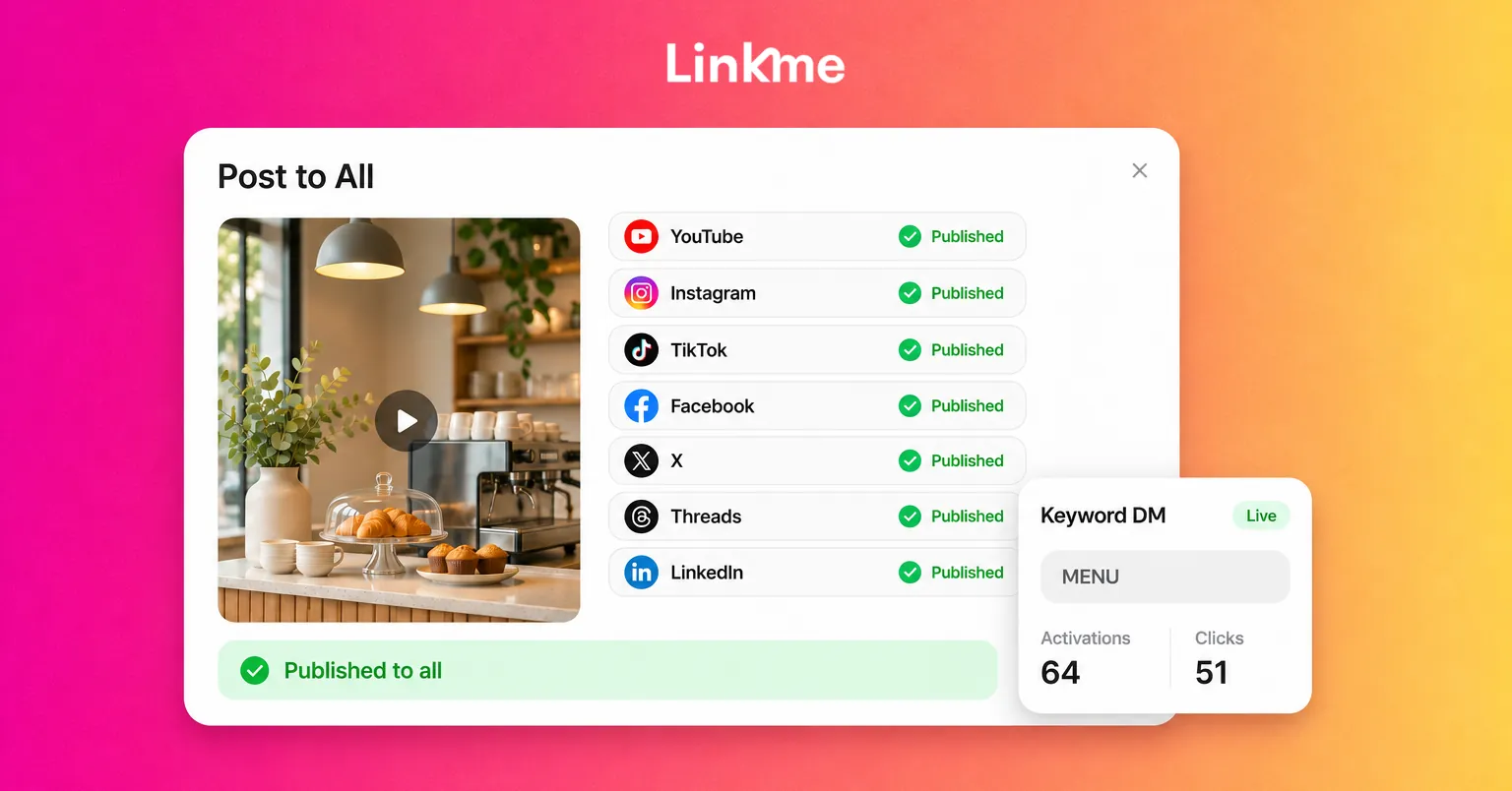
The fix: Upload once and publish to every network together. With Linkme Post to All, you add a video, image or carousel once, write one caption for every network or a different one where a network needs it, and publish to YouTube, Instagram, TikTok, Facebook, X, Threads and LinkedIn, now or at a scheduled time. Linkme Business adds Pinterest, Reddit, Bluesky, Telegram, Discord and Google Business Profile. Each network’s character limit is checked as you type, so you do not find out later that X cut off your caption.
You also do not need to open every app to check the post went out. Each network shows its own status. If one misses, the post is marked Partially posted, and Retry failed platforms sends it again only to that network.
Make it a habit: Batch your posts. One session a week to prepare and schedule the next week’s posts takes less time than posting live every day, because you only get into “content mode” once. For more on adapting one post for several networks, see how to cross-post on social media.
Drain 2: Answering the same questions in DMs
If you run a restaurant, gym, shop or venue, a large share of your DMs ask for one of a few links: the menu, the booking page, the schedule, the store.
The fix: Let an automation send the link. With Linkme DM Automations, you choose a post on Instagram or a Facebook Page, set a keyword such as BOOK or MENU (or answer every comment), and Linkme sends a DM with your link and can post a public reply under the comment. Automations can also answer messages people send you directly. On Instagram a reply can include up to three link buttons, and a person gets an automatic reply to any message at most once every 24 hours.
To keep it from feeling robotic, set a reply delay. Linkme lets you choose anywhere from 1 second to 15 minutes, and the app suggests 30 to 90 seconds. You can also rotate up to five versions of the public reply.
Where to start: Look at last week’s DMs, find the three most common questions and build one automation for each.
Drain 3: Retyping the same answers
Some questions need a person, but the answer is still mostly the same each time: your returns policy, parking directions, how to book a private event.
The fix: Write those answers once as saved replies. In Linkme’s Social Inbox, Instagram and Facebook comments and DMs arrive in one list, and you can insert a saved reply into any conversation, then adjust a line before you send it. If someone else helps with messages, internal notes in the thread show who is handling it, so two people do not answer the same customer.
Having comments and DMs in one place saves time too: you work through one list instead of checking two apps for each account.
Drain 4: Small edits to your link page
The page in your bio needs regular small changes: this weekend’s event at the top, a new menu, a seasonal offer swapped in, an old promotion taken down. Each one means opening an editor, finding the link, dragging it, saving and checking it on a phone.
The fix: Ask for the change in a sentence. Link, Linkme’s AI social media manager, can make edits like “move the menu link to the top” or “switch my page to the fall photo.” Each change arrives as a card showing what will change, and nothing on your page moves until you press Approve. Link comes with every Linkme Business package.
For changes you know about in advance, such as a weekend offer, schedule the link instead. The Link Scheduler gives any link a start and end time, so it goes live and comes down on its own.
Drain 5: Checking numbers app by app
Opening each network’s insights to work out what happened costs time and rarely gives a clear answer.
The fix: Check once a week, in one place, and ask specific questions. Which link got the most clicks? Which city did visitors come from? Did this week beat last week? With Link you can ask those questions in plain words and get the answer as a card from your page’s analytics.
A weekly routine for busy owners
| When | Task | Time |
|---|---|---|
| Monday | Check last week’s top links and any automation that is not getting clicks | 15 minutes |
| Tuesday | Prepare and schedule the week’s posts to every network in one session | 45 minutes |
| Daily | Clear the inbox once, using saved replies | 10 minutes |
| As needed | Ask Link for page changes and approve them | 2 minutes each |
The times are a starting point. Adjust them to your business, but keep the shape: create in one block, reply in one block and check results once.
What not to automate
Some things still need you: complaints, refunds, anything sensitive and conversations with your best customers. Pause the automation for that conversation and answer personally. Saving time on routine work is what gives you time for these.
Frequently asked questions
How much time should a small business spend on social media?
There is no single right number. Track a normal week first, then set a fixed time budget for creating, replying and reviewing. Most owners save the most by batching posts and automating repeated questions, not by posting less.
What social media tasks should I automate first?
Start with the jobs you repeat most: publishing the same post to several networks and answering the same DM questions with a link. Those two usually take the most time and are the easiest to automate well.
Will automated replies make my business seem impersonal?
Not if you set them up carefully. Use a short reply delay, rotate a few versions of the public reply, only automate questions that have a clear link as the answer, and hand anything personal to a human.
Is it better to schedule posts or post live?
Scheduling lets you prepare a week in one session, which saves the most time. Post live for things that are actually happening, such as an event in progress or a sell-out, and schedule the rest.
You can see the whole workflow, from one upload to every network, on the Post to All page.