Setting Boundaries as a Creator: Brand Deals, DMs and Response Hours
How to say no to brand deals without burning bridges, keep DMs to set hours, let automation answer the repeat questions and agree in writing what your agency can post for you.
On this page
Setting boundaries as a creator means deciding in advance which deals you accept, when you answer messages and what other people can do on your behalf, then putting systems in place so those decisions hold on a busy week. Without them, every brand email, DM and late-night comment becomes a decision you make under pressure. This guide covers how to say no to brand deals, set DM boundaries and response hours, use automation as a buffer and agree approval rules with a manager or agency.
Why creator boundaries matter
Creators are reachable all day, by thousands of people, across several apps. That is what makes the work possible, and it is also what wears people down. Creator boundaries are not about being less available to your audience. They are about deciding where your attention goes, so that the work you care about gets your best hours.
Boundaries also protect your audience’s trust. A creator who accepts every deal, promotes products they have not tried or answers DMs at 2 a.m. in a rush is more likely to make a mistake in public.
Saying no to brand deals
Set your criteria before the offers arrive
Write a one-page list of what a deal must meet before you consider it. For example:
- Fit: Would you use or recommend this product without being paid?
- Audience: Is it relevant and appropriate for the people who follow you?
- Terms: Is the fee, deliverable count and timeline clear in writing?
- Usage: How long can the brand use your content, and where? Is paid usage, such as running your video as an ad, priced separately?
- Exclusivity: Does it stop you working with other brands in the category, and for how long?
- Workload: Can you deliver it in your normal schedule without cancelling other commitments?
If an offer fails any of the first two, the answer is no. If it fails the others, the answer may be “not on these terms.”
Use a reply you have already written
Saying no is harder when you write it from scratch each time. Keep two short templates:
Thanks for thinking of me. This one is not the right fit for my audience, so I’ll pass, but I appreciate you reaching out.
Thanks for the offer. I’d consider it with a different scope: [deliverables, usage period, fee]. If that works, I’m happy to continue.
You do not owe a long explanation. A short, polite answer protects the relationship and your time.
Keep disclosure non-negotiable
If you accept a deal, disclosure is part of the work, not a favor to the brand. The FTC’s Disclosures 101 for Social Media Influencers says not to assume a platform’s disclosure tool is good enough on its own, to put the disclosure with the endorsement itself and, for video, to include it in the video, not only in the description. Treat any brand that asks you to hide a partnership as a reason to say no.
Setting DM boundaries and response hours
Decide when you answer
Pick response hours and stick to them, for example a 30-minute block at midday and another in the early evening. Outside those blocks, notifications stay off. Tell your audience in your bio or pinned post when you usually reply, so silence does not read as rudeness.
Work through one list, not five apps
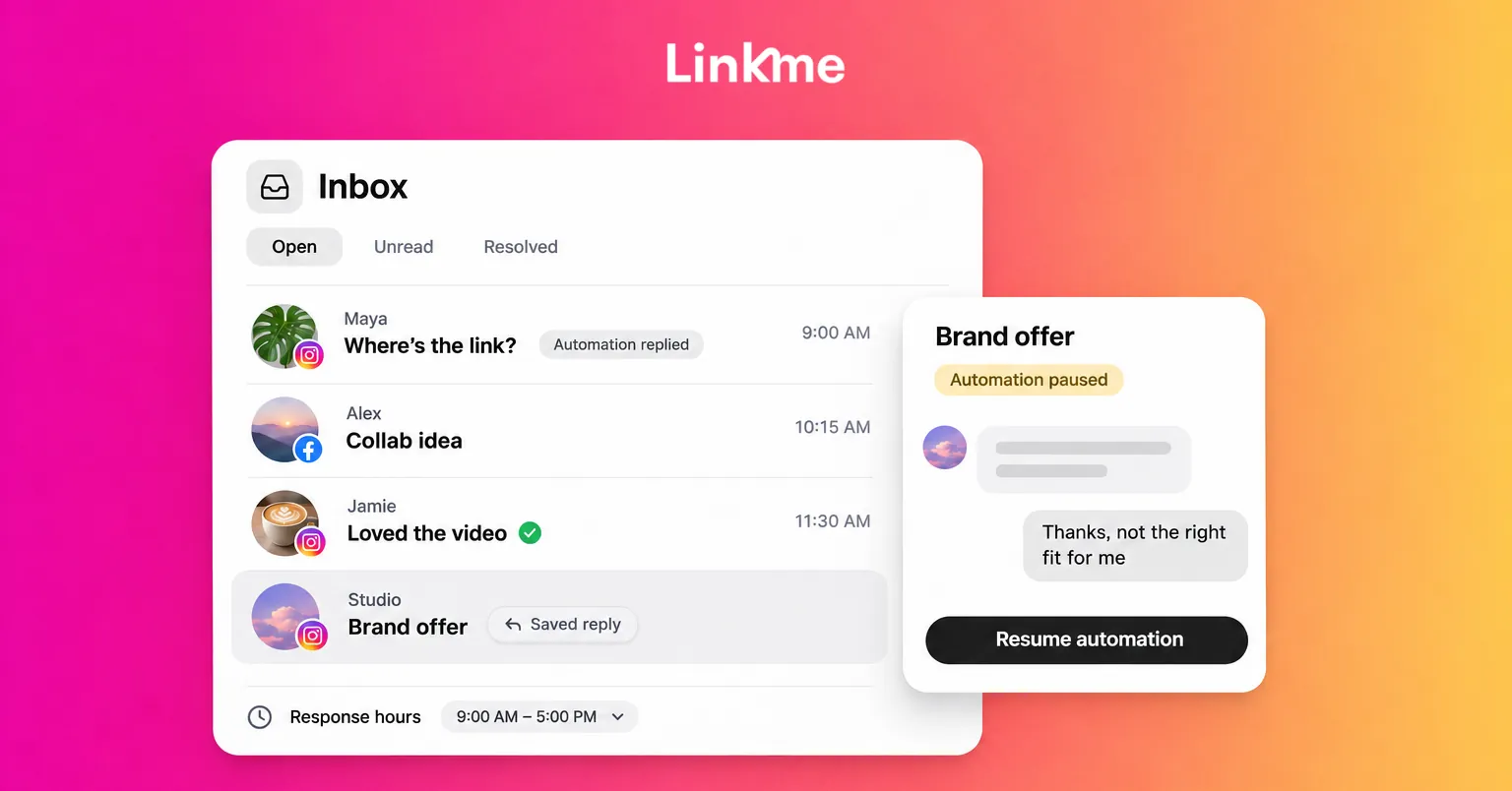
Checking Instagram, Facebook, email and other apps separately makes every session longer. A shared list lets you open, answer and close a session. In Linkme Social Inbox, Instagram and Facebook direct messages and the comments on your posts and reels arrive in one place. Open, Unread and Resolved show what is still waiting, and marking a conversation resolved moves it out of Open, so you can finish a session with a clear list.
Two features help keep sessions short:
- Saved replies: write the answers you give every day once, each with a title, and insert one into any reply.
- Internal notes: leave context in the thread for whoever opens it next. Notes are never sent to the person you are talking to.
Filter what you never want to see
Instagram’s Hidden Words settings can hide comments and message requests that contain offensive words, phrases or emojis, so they do not land in your main view. You can also add your own list of words you never want to see. Set these up once and review the list every few months. See Instagram’s Hidden Words help page for the current options.
Using automation as a buffer
Many DMs ask the same things: where to buy, the link to the latest video, how to book you. Those questions deserve an answer, but they do not need you personally.
DM automations can answer them for you. On Linkme you pick a post and a keyword, or answer every comment, and Linkme replies publicly, sends a DM with your text and your link, and counts the activations and clicks. For messages people send you directly, an automation can reply to keywords or to any message with up to three links as buttons, and with Any message each person gets the reply once every 24 hours at most.
Useful settings for a boundary-friendly setup:
- Reply delays: set a delay for the public reply and the DM, from 1 second to 15 minutes. Linkme suggests 30 to 90 seconds, which reads as natural.
- Rotating public replies: up to five variations, so comment threads do not look copy-pasted.
- Pause for one conversation: in Social Inbox, pause the automation for a single conversation when a real person needs you, answer yourself, then resume it. Manual replies do not pause it on their own.
The aim is to reserve your response hours for the messages that actually need you: collaborators, fans with real questions and anything sensitive.
Approval rules with a manager or agency
Handing over parts of your channels can protect your time, but only if everyone knows the limits. Put these in writing:
- What they can publish without you. For example, reposting scheduled content is fine; new sponsored posts are not.
- What needs your approval. Anything with your face, voice, a brand partner or a statement of opinion.
- What they can say in your name. Agree whether they can reply to comments or DMs, and in what tone.
- What they must escalate. Legal questions, press requests, complaints and anything involving safety.
- How fast you will review. A boundary works both ways: commit to a review window so your team is not left waiting.
With Linkme for Agencies, your manager or agency can run your page, Post to All, DM automations and leads from their own login while you keep your account. Agency manager access does not include the Social Inbox, so your direct conversations stay with you unless you decide otherwise. If your team works in a Linkme Business account, people on the Manager role have their posts wait for an owner or admin to approve them, and changing an approved caption or time sends the post back for approval.
A weekly boundary check
Once a week, take ten minutes to ask:
- Did I say yes to anything that broke my deal criteria? Why?
- Did I answer messages outside my response hours? Which ones, and could automation have handled them?
- Did anything go out under my name that I had not approved?
- Is there a recurring question I should add to a saved reply or an automation?
Adjust one thing at a time. Boundaries that change every week are hard for anyone, including you, to follow.
Frequently asked questions
How do creators say no to brand deals politely?
Use a short, prepared reply that thanks the brand and declines without a long explanation. If the issue is the terms rather than the brand, say what scope, usage period or fee would work instead.
What are good DM boundaries for creators?
Set fixed response hours, tell your audience when you usually reply, filter offensive or spam messages with platform tools and let automation answer repeat questions so your time goes to messages that need you.
Is it unprofessional to use automated replies?
Not when they answer common questions clearly and a person steps in for anything else. Use reply delays and varied public replies so responses read naturally, and pause the automation in conversations where someone needs a personal answer.
What should a creator agree with their agency about approvals?
Agree in writing what the agency can publish without you, what needs your sign-off, what it can say in your name, what it must escalate and how quickly you will review drafts.
Boundaries are easier to keep when your tools enforce them. Linkme brings your Social Inbox, DM automations and page together so you can answer on your schedule.


