Visual Storytelling on Social Media: Story Arcs, Carousels and a Consistent Look
Turn images and video into stories people follow: a three-beat arc, carousels that control the order, five rules for a consistent look, and AI images you approve before they go out.
On this page
Visual storytelling on social media means using a sequence of images or video to take someone from a situation they recognize to a change they care about, so the picture carries the message before anyone reads the caption. The strongest posts follow a simple story arc, use a consistent brand look so people recognize you mid-scroll and use formats such as carousels and short video to control the order in which people see things. This guide covers each of those, plus how to use AI images for social media without losing control of what goes out.
What makes a visual a story
A photo of a product is information. A photo of a product in the hands of someone who just solved a problem with it is a story. The difference is change: something was one way, and now it is another.
The three-beat arc
Most effective social visuals follow three beats:
- Setup: a situation the viewer recognizes. A messy desk, an empty stadium an hour before kickoff, a rainy Monday.
- Turn: the moment something changes. The product, the person, the event.
- Payoff: the result, and a reason to act. The finished room, the full stands, the booking link.
A single image can hold all three if it shows the result with a hint of what came before. A carousel or a 15-second video can give each beat its own frame.
Story types that work on social
| Story type | Setup | Turn | Payoff |
|---|---|---|---|
| Before and after | The problem | The process | The result |
| Behind the scenes | The finished thing | How it was made | The people who made it |
| Customer story | Their situation | What they tried | What changed |
| Day in the life | The morning | The key moment | The evening |
| Countdown | What is coming | Preparation | The launch or event |
Pick one per post. Mixing two story types in one carousel usually confuses both.
Carousel storytelling
Carousels are one of the most useful formats for brand storytelling because the viewer controls the pace but you control the order.
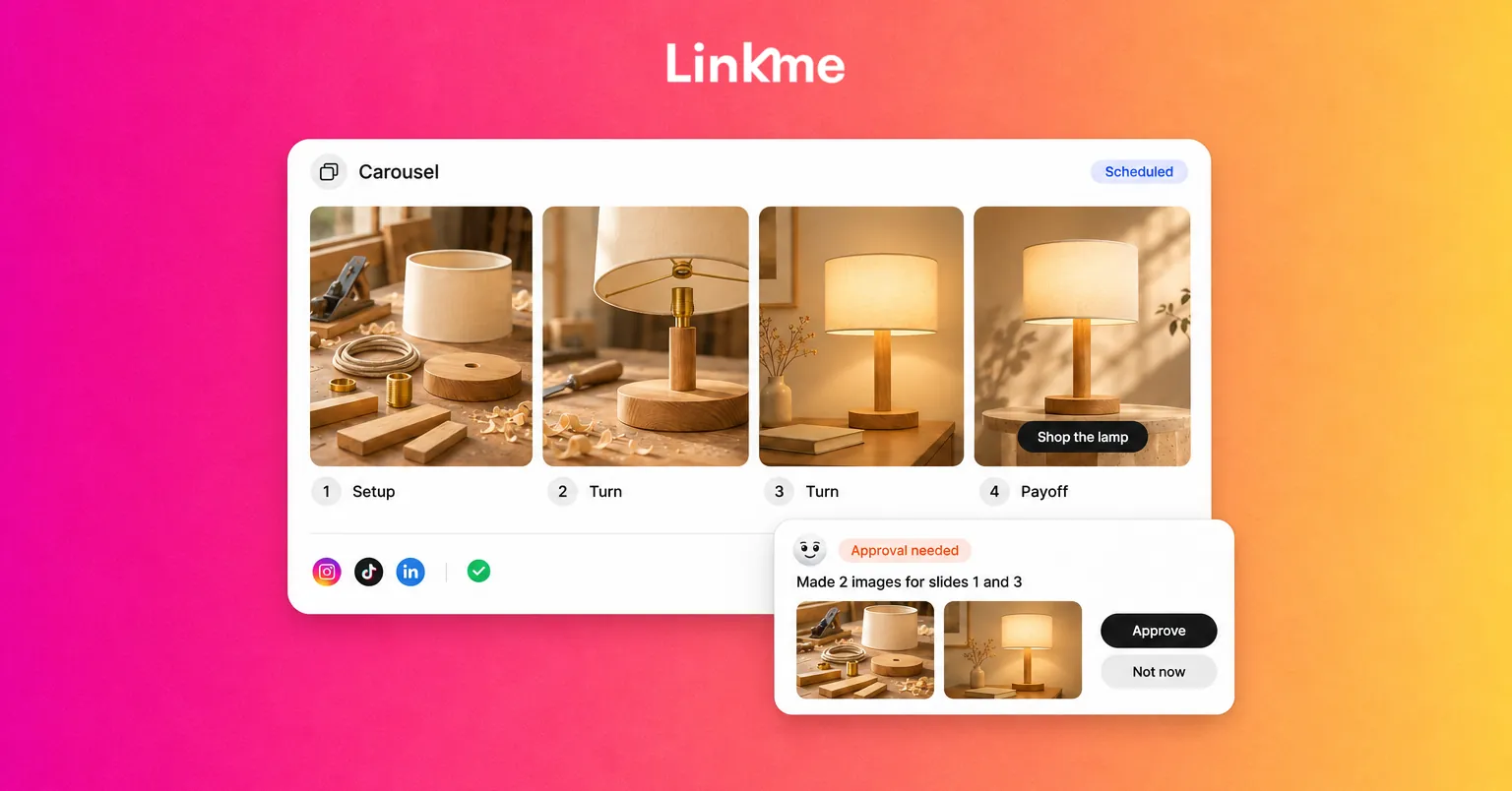
Structure a carousel like a short story
- Slide 1, the hook: the setup or a striking result. It must work on its own, because many people see only this slide.
- Middle slides, one idea each: one step, one detail or one moment per slide. If a slide needs a paragraph to explain it, split it.
- Final slide, the payoff and next step: the result and what to do now, such as visiting a page or commenting a keyword.
Keep visual continuity between slides: the same light, palette and framing. A carousel that changes style on every slide reads as a collection, not a story.
Mind each network’s carousel rules
Networks treat carousels differently. When you publish with Post to All, the composer shows how many photos each network takes in one carousel, and you can frame photos square, portrait or landscape. As published through Post to All, Instagram and Facebook carousels take up to 10 items, X up to 4, Threads and LinkedIn up to 20 and TikTok up to 35. Plan your story so the essential beats fit the shortest version you will publish.
Video as visual storytelling
Short video adds motion and sound, which makes the turn in your story easier to show.
- Open on the change, not the logo. The first second decides whether people keep watching.
- Show, then tell. Let the action carry the story and use captions or voiceover to add what the image cannot.
- Design for sound off. Many people watch muted, so on-screen text should carry the key line.
- Pick the cover frame on purpose. The cover is the setup slide of your video. In Post to All, a video gets the cover frame you pick.
Build a consistent brand look
Consistency is what lets people recognize your post before they see your name. It does not require every post to look the same. It requires a few fixed rules.
Five rules to fix
- Color: two or three brand colors that appear in most frames, through props, backgrounds or overlays.
- Type: one typeface and one weight for on-screen text, always in the same position.
- Framing: a default crop and distance, such as close-up product shots or wide venue shots.
- Light: natural, studio or moody, chosen once and kept.
- Subject: the people, places or objects that recur, so your feed has familiar faces.
Write these on one page and share it with everyone who makes content, including freelancers and creators you work with.
Check consistency in a grid
Before you publish a new series, place the next nine planned images in a grid next to your last nine posts. Anything that looks out of place in the grid will look out of place in the feed.
Using AI images for social media
AI tools can make the visuals for a story much faster, from concept images to short clips and voiceovers. They are most useful for:
- Illustrating ideas that are hard to photograph, such as a concept or an abstract benefit.
- Making variations of a layout for testing.
- Producing backgrounds, textures and title cards in your brand style.
They are least suitable as proof. A product result, a customer, a venue or an event should be shown with real footage. A generated “customer photo” undermines the trust a story is meant to build.
Keep a person in the approval step
Link, Linkme’s AI social media manager, drafts posts and makes the images, videos and voiceovers for them. Nothing goes live until you approve it, and Link schedules a post only after you approve each step. That approval step is where you check the story arc, the brand rules above and the accuracy of anything the image implies.
When you prompt for visuals, include your brand rules in the request: palette, framing, light and subject. For more on writing prompts, see AI prompts for social media captions and content planning.
Disclose realistic synthetic content
Platforms increasingly ask creators to label realistic AI-generated or altered content. YouTube, for example, asks creators to disclose meaningfully altered or synthetic content that seems realistic, such as a real person appearing to say something they did not, while clearly unrealistic content and minor edits like color correction do not need disclosure. Check each network’s current rules before publishing generated visuals that look real.
A simple workflow for one visual story
- Choose one story type and write the three beats in a sentence each.
- Decide the format: single image, carousel or short video.
- List the shots or slides, one idea each.
- Shoot the real moments; generate only the illustrative ones.
- Apply your five brand rules and check the grid.
- Write the caption to add context, not to repeat the image.
- Review, approve and schedule.
Frequently asked questions
What is visual storytelling on social media?
It is using images and video to show a change, from a situation people recognize to a result they want, so the visuals carry the message. Carousels and short videos help by controlling the order in which people see each beat.
How do you tell a story in an Instagram carousel?
Use the first slide as a hook that works alone, give each middle slide one idea and end with the payoff and a clear next step. Keep the same light, palette and framing across slides.
Can you use AI images in brand storytelling?
Yes, for illustration, concepts, layouts and backgrounds. Use real photos and footage for proof such as customers, results and events, and review every generated visual before it is published.
Do AI-generated images need to be labeled on social media?
Some platforms require it for realistic synthetic content. YouTube asks creators to disclose realistic altered or synthetic content, and other networks have their own rules, so check each one before posting.
To draft visual posts and approve every image and video before it goes out, see Link, Linkme’s AI social media manager.