Digital Detox for Creators: How to Take a Break Without Going Dark
Take a real break without your accounts going quiet: schedule posts ahead, let automations answer the repeat questions, and come back with a 30-minute review.
On this page
A digital detox for creators is a planned break from posting, scrolling and answering messages, set up so your accounts keep running while you are away. The trick is to do the work before you leave: schedule a week or two of posts, let automations answer the questions you get every day, tell partners when you will be back, and come home to a short review instead of a pile of unread messages.
Here is how to plan the break, what to set up so you don’t go dark, and how to come back without losing the momentum you built.
Why creators find it hard to log off
For most people, social media is a habit. For creators it is also the job, the shop window and the customer service desk. Stepping away can feel risky: will the algorithm forget you, will a brand deal slip, will followers think you’ve quit?
Those worries are why many creators never take a real break, and why their breaks are full of “quick checks.” A social media break works when the account has a plan for running without you, so you have nothing to check.
If you notice that posting has started to affect your sleep, mood or relationships, take it seriously: creator mental health matters more than any posting streak. A break can help, but it is not a substitute for support. Talking to a doctor or mental health professional is a sensible step if those feelings don’t lift.
Choose the kind of break you need
| Break | Length | What keeps running | Good for |
|---|---|---|---|
| Weekend off | 2-3 days | Scheduled posts | Regular recovery |
| Posting break | 1-2 weeks | Scheduled posts, DM automations | Vacations, busy periods, burnout prevention |
| Full detox | 2 weeks or more | Light scheduled posts or a pinned “back soon” post, automations | Major rest, life events |
| Reduced mode | Ongoing for a period | Fewer posts, automations | Exams, a new baby, an injury |
Be honest about what you need. A full detox with a few scheduled posts is still a detox, as long as you are not the one watching the comments.
Two weeks before: plan the content
Pick content that doesn’t need you
The best posts to schedule before a break are ones that don’t depend on a live conversation:
- Evergreen tips, tutorials and how-tos from your niche.
- Behind-the-scenes clips you filmed but never posted.
- Repackaged favorites: a carousel from an old video, a short cut of a long one.
- A “best of” post that points people to your most useful content.
Avoid scheduling anything that will drive urgent questions you can’t answer, such as a launch, a giveaway or a time-sensitive offer.
Batch it in one or two sessions
Block a day to film and a day to edit and write captions. Write captions for each network at the same time, so you are not adapting them one by one later. If you are stuck for words, an AI drafting tool can give you a first version to edit.
Schedule posts before vacation
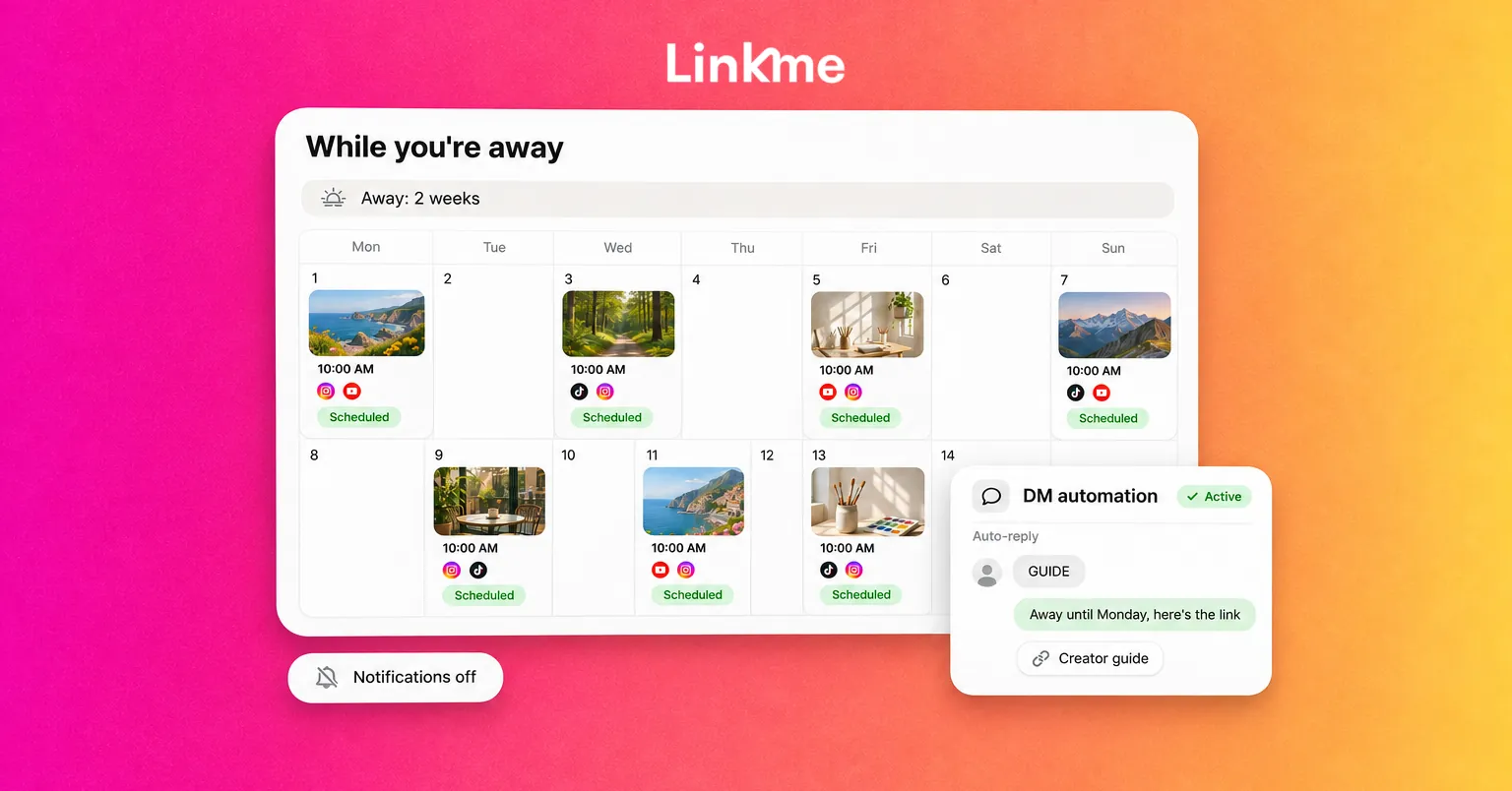
Put every post on a calendar with its date, time and networks, then schedule it. Check the schedule in a week view: is there a post on the days you want, and nothing on the days you don’t? Do one test post to confirm your accounts are still connected, because an expired connection is a common reason a scheduled post fails.
With Linkme’s Post to All, you upload a video, image or carousel once and publish it to Instagram, TikTok, YouTube, Facebook, X, Threads and LinkedIn, now or on a schedule. You can write one caption or one per network, see every scheduled post by day, week or month, and edit a scheduled post before it goes out. If a network misses, the post shows as partially posted and you can retry just that network.
Let automations answer the repeat questions
Most creator DMs are versions of the same few questions: where’s the link, what camera do you use, how do I work with you, where can I buy that. While you are away, those can be answered automatically.
- Comment keywords. On a scheduled post, ask people to comment a word (for example GUIDE) to get the link in their DMs.
- Any comment. For a post where everyone wants the same thing, reply to every comment with the link.
- Incoming DMs. Set a reply for messages that mention partnerships or your shop, with the right link.
With Linkme’s DM Automations, which run on Instagram business and creator accounts and Facebook Pages, you pick posts or reels, choose keywords or any comment, and write the DM once with any link. Automations can also reply to messages people send you, and when set to answer any message, each person gets the reply once every 24 hours at most. Keep the tone honest: say you’re away, give the link, and say when you’ll be back.
Keep your link in bio current while you’re gone
If something needs to go live or come down while you are away, such as a ticket link or a limited offer, a scheduled link can handle it. On Linkme, the Link Scheduler on Plus and Pro lets you set a start and end time for a link on your page.
Tell people before you go
- Brand partners and your manager: share your dates, confirm any posts that are due during the break, and name who to contact in an emergency.
- Your audience: you don’t owe anyone an announcement, but a short “taking a couple of weeks off, posts will keep going” story sets expectations.
- Collaborators: move any shoots, calls or deadlines out of the window.
During the break: remove the temptation
- Log out of the apps, or move them off your home screen.
- Turn off notifications from social apps and creator inboxes.
- Agree on what counts as an emergency (a partner deadline, a security alert) and who will tell you.
- If someone helps run your account, give them their own access rather than your password.
Resist the urge to “just check the numbers.” The numbers will still be there when you get back.
Coming back: a 30-minute review
Don’t try to read everything. Spend half an hour on:
- Messages that need a person. Skim the DMs your automations didn’t handle and reply to partners first.
- What performed. Check which scheduled posts did best and which links got clicks. That tells you what to make more of.
- Anything that failed. Confirm every scheduled post went out, and fix any account that needs reconnecting.
- One next step. Plan your first new post, not your next month.
Then ease back in. Plan the next week the same way you planned the break, so you keep a buffer of scheduled posts instead of starting from zero.
Frequently asked questions
Will taking a break from posting hurt my reach?
Reach can dip when you post less, and how much depends on your niche and how long you are away. Scheduling a steady set of posts keeps the account active, and coming back with well-planned content helps you pick up where you left off.
How far ahead should I schedule posts before a vacation?
Cover the whole break plus two or three days after you return, so you are not rushing to post on your first day back. For a two-week break, that usually means scheduling 15 to 17 days ahead.
Should I tell my followers I’m taking a social media break?
It is up to you. A short story or post sets expectations and explains slower replies, but you can also let scheduled posts run quietly. Brand partners should always know your dates.
Can automated DMs make me seem unavailable or fake?
Not if they are honest. Say you are away, give the link or answer people asked for, and say when you’ll be back. People appreciate a quick, useful reply over silence.
A real break is part of a sustainable creator career. Plan it like a launch, let your schedule and automations carry the account, and come back with fresh ideas. If you want to set up your next break in one place, see how Linkme works for creators and athletes.


