Professional Branding: How to Look Consistent Everywhere Online
Keep your name, photo, bio, handles and link page consistent on every network, with a one-page brand kit and a quarterly audit checklist.
On this page
Someone finds your name on LinkedIn, taps through to Instagram and lands on a link page. If each stop shows a different photo, a different job description and a different handle, they start to wonder whether they have the right person. Good professional branding removes that doubt: the same name, face, promise and look wherever people meet you, so recognition builds instead of resetting at every profile.
This guide is about that consistency layer for consultants, freelancers, executives and small teams. It covers a simple brand kit, a bio formula you can adapt per network, matching handles and a link page that looks like the rest of your brand.
Why consistency matters more than polish
A professional brand image is mostly about recognition and trust. People decide quickly whether a profile belongs to the person or business they were looking for. Matching details answer that question before it is asked.
Consistency also saves time. When the decisions are already made, a new profile, a conference badge or a slide deck takes minutes instead of a debate about which photo or title to use.
Polish still helps, but a modest, consistent presence usually does more than one beautiful profile next to four neglected ones.
Build a one-page brand kit
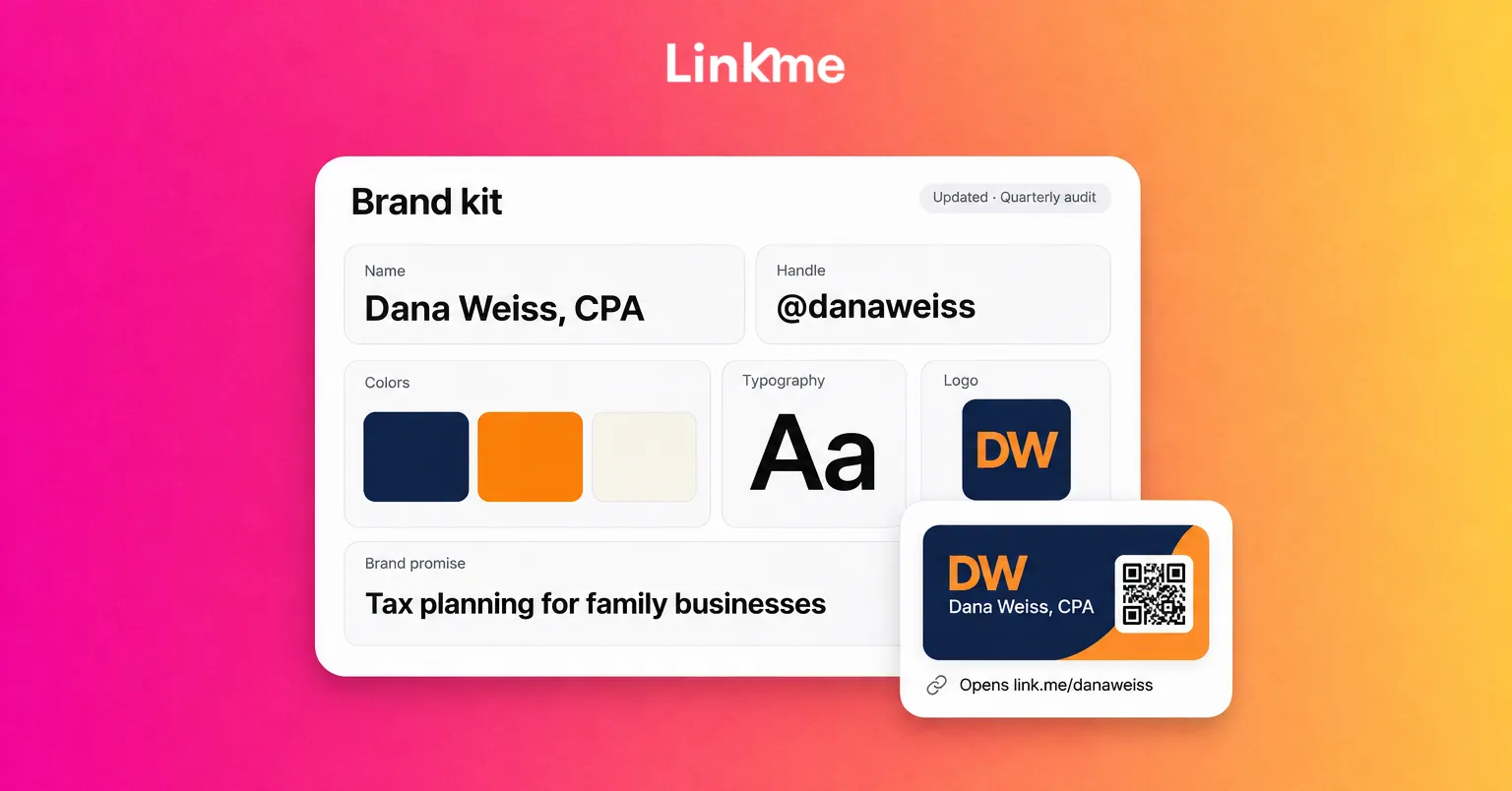
A brand kit is a short reference document that anyone helping with your profiles can follow. It does not need a designer. Keep it in a shared document and update it when something changes.
| Element | What to decide | Example |
|---|---|---|
| Name format | The exact name people see | “Dana Weiss” or “Dana Weiss, CPA”, used the same way everywhere |
| Handle | One username, plus approved fallbacks | @danaweiss; fallback @danaweisscpa |
| Profile photo | One current photo or logo, with crop notes | Head and shoulders, plain background, centered for circle crops |
| One-line promise | Who you help and with what | “I help family businesses plan for tax season” |
| Colors | A main color, an accent and a neutral | Navy, warm orange, off-white |
| Fonts | One heading font and one body font | A clean sans serif for both is fine |
| Logo | Files for light and dark backgrounds | Square version for small spaces |
| Tone | Three words that describe how you write | Clear, practical, friendly |
The profile photo deserves its own care, but the rule here is simple: pick one and use it everywhere until you deliberately replace it everywhere.
Use one bio formula across networks
Writing a separate bio for every platform from scratch is how profiles drift apart. Start from one formula and trim it to fit.
The formula: role or expertise + who you help + proof point + one call to action.
- Long version (LinkedIn About, your link page): “Tax advisor for family-owned businesses. I help owners plan cash flow around tax deadlines. Fifteen years in practice. Book a call below.”
- Medium version (Instagram, X): “Tax advisor for family businesses. Cash-flow planning around deadlines. Book a call ↓”
- Short version (TikTok, Threads): “Tax tips for family businesses. Book below.”
Bio limits differ by network and change from time to time, so check the edit screen rather than relying on a number you read somewhere. The shorter versions should be cuts of the long one, not new claims.
A professional bio also needs to stay true. Update the proof point when it changes, and remove credentials or titles you no longer hold.
Claim matching handles and names
Consistent branding across social media starts with the handle, because it is what people type, tag and search.
- Search your preferred handle on every network you use or might use. Claim it even on networks you are not active on yet, so nobody else does.
- Pick one fallback pattern if the first choice is taken, such as adding your profession or city, and use the same fallback everywhere it is needed.
- Match display names. The display name is often searchable and can be clearer than the handle. Keep the same wording on every profile.
- Record every handle in your brand kit, with the login owner and recovery email, so nobody is guessing later.
- Retire old accounts properly. Point an old profile to the new one in its bio, or close it, rather than leaving a stale version for people to find.
Make your link page part of the brand
Most networks give you one place for a website link, so the page behind it is often the final step before someone books, buys or gets in touch. If that page uses default styling while everything else is on-brand, it feels like a detour.
With Linkme Pages & QR you can bring the page in line with your brand kit:
- Colors and font. Set the background color, text color and font to match your kit.
- Link styles. Choose small, medium, big or button links, with their own icon or thumbnail, so the most important action stands out.
- Video profile. Put a short video behind or in place of your profile photo if moving content suits your brand.
- Your own logo. Free pages carry a Powered-by-Linkme badge. On Linkme Pro, you can swap the Linkme mark for your own logo.
- Sections in your order. Add links, headers, events, videos, products and contact options, then drag sections into the order that matches your priorities.
Pro and the Linkme Business packages also include Link, an AI assistant that can change the bio, profile photo, theme, font and links when you ask in plain words. Each change arrives as a card showing the before and after, and nothing changes until you approve it. That makes it practical to apply a brand kit update in one conversation instead of hunting through settings.
Take the brand offline with the QR code
Every Linkme page has its own QR code that always opens the live page. Put it on business cards, slides, name badges or a printed one-pager. When your title, offer or booking link changes, update the page and the printed code keeps working, so your printed materials do not fall out of date along with the details.
Keep a team on the same brand
Small teams drift faster than individuals because more people touch the profiles. A few habits keep everyone aligned:
- Share the brand kit with everyone who posts or edits profiles, and link to it in your onboarding notes.
- Give each person their own login with the access they need rather than a shared password, so changes are traceable.
- Agree who approves profile changes, such as a new photo or a different bio, in the same way you would approve a post.
- Keep one source for current assets. Old logos and outdated photos tend to come back from someone’s downloads folder.
Run a quarterly brand audit
Set a recurring reminder and check every public profile against the kit. It takes about as long as a coffee.
- [ ] Same photo or logo on every profile, cropped well in a circle
- [ ] Same display name and handle, or the recorded fallback
- [ ] Bios follow the formula and the proof point is current
- [ ] Every bio link opens the same page, and that page uses your colors, font and logo
- [ ] Old accounts point to current ones or are closed
- [ ] Printed QR codes still open the right page
- [ ] Pinned or featured posts still reflect what you offer today
Fix what you find straight away, then note any change to the kit itself so the next audit checks against the new version.
Frequently asked questions
What is professional branding?
Professional branding is how a person or small business presents its expertise consistently across profiles, content and printed materials. It covers the name, photo, bio, visual style and tone people see, and whether those details match wherever someone finds you.
How do I make my branding consistent across social media?
Write a short brand kit with your name format, handle, photo, one-line promise, colors, fonts and logo. Use one bio formula trimmed to each network, claim matching handles, and make the page in your bio use the same colors, font and logo. Then audit every profile on a schedule.
Should my personal and business profiles look the same?
They should be recognizably related if they point to the same work, with the same name, photo or logo and a similar bio. You can keep a personal account separate if you prefer, but avoid two profiles that compete for the same search with different information.
Can I remove Linkme branding from my page?
Free pages show a Powered-by-Linkme badge. Linkme Pro lets you swap the Linkme mark for your own logo, alongside animated links and other Pro features.
A consistent brand is mostly a set of decisions made once and applied everywhere. Write the kit, match the profiles, and make the page behind your bio look like it belongs to you. You can build your Linkme page with your own colors, font and QR code, and compare plans on the pricing page.