

Every show, every night, one link to all of it.
Venues, promoters and festivals put the lineup, tickets, guest sign ups and every social account behind one Linkme page.
Real Linkme customer pages and public posts. Guests, commenters and figures in the dashboard are illustrative. The venue page in Add Event is a sample. Counts are sped up.
A night out in four parts. A fan comments LINEUP under LIV Miami's real Friday poster, gets a public reply and a DM with the week's nights, and opens the EVENTS row on LIV's real Linkme page. In Add Event, Friday's Rooftop Session is added to a sample venue page and lands in its events as a ticket stub. A guest types an email into LIV's real Connect with field and lands in Leads. Last, the Event reminder template goes to every active contact and the email arrives on a guest's phone above two earlier emails.
Events and venues on Linkme

From the first teaser to the night after
How one show reaches its crowd, step by step, and who on the team runs each part.
- 01
Build anticipation
Teasers and the poster go out to every account at once, now or on a schedule.
- Who
- Social media team
- With
- Post to All
- 02
Promote the lineup
Every night sits on one page with its date, venue and ticket link, behind one QR code.
- Who
- Marketing team
- With
- Pages & QR
- 03
Deliver ticket and VIP links
A comment like TABLES or LINEUP gets the right link by DM. Tickets and tables are sold on your own ticketing and booking sites.
- Who
- Social team sets it up once
- With
- DM Automations
- 04
Handle questions
Messages and comments that need a person land in one inbox, with notes and saved replies.
- Who
- Guest services or the social team
- With
- Social Inbox
- 05
Build an opted-in audience
Guests leave their email on the page, by their own choice, and land in Leads with their source.
- Who
- Marketing team
- With
- Lead capture
- 06
Follow up after
The next night goes to everyone who opted in, as an email sent right away.
- Who
- Marketing team
- With
- Email campaigns
Every show on the page, with its ticket link
Create an event with its date, venue and ticket link, or sync a tour from BandsInTown. Tickets opens your ticket seller.
Sample venue and artist pages, on real Linkme product screens. Linkme does not sell tickets. Every Tickets button links to your ticket seller.
Setup BandsInTown syncs four tour dates for a sample artist and they fill the artist's page, each with its ticket link.
The ticket link goes live on sale day
Set a start and an end: the link goes live the minute tickets go on sale and comes down after the event.
Real Linkme customer pages. Dates and the countdown are illustrative. Counts are sped up. The link scheduler comes with every Business plan. Visitors see the link once it is live.
In Schedule a Link, LIV Miami's real Experts Only tile gets a start and an end date and is scheduled; the preview shows This link is scheduled to go live in with the seconds running down, the status turns Live on its on sale day and the tile arrives on LIV's real page, where it opens livnightclub.com.
Guests leave their email on your page
LIV's page asks for one thing under its name: an email. Every guest lands in Leads with its source, ready for the next invite.
A real Linkme customer page and its real email field. Guests and figures are illustrative.
On LIV Miami's real Linkme page a guest types guest@example.com into the Connect with field and taps it; Connected successfully! In Leads the guest lands at the top of the Email List with Subscribe as the source, Total contacts goes up by one and Export CSV saves leads.csv.
See how they run it
Each story is read off the brand's own live Linkme page: what they put on it, how it is laid out and the numbers it shows.

Global tournament
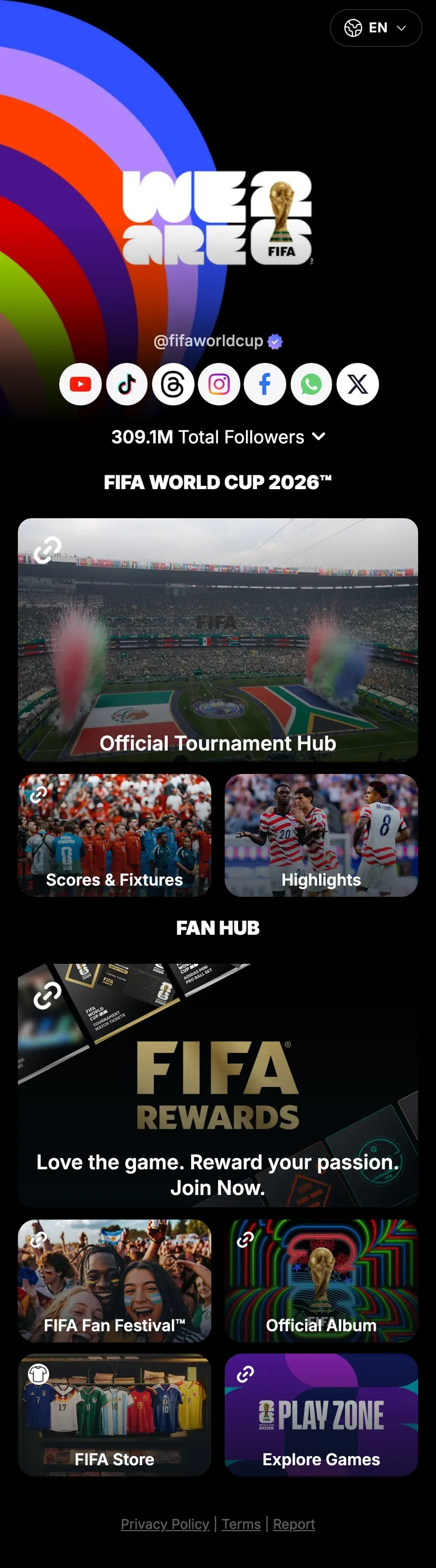
FIFA World Cup 26
The official tournament page sends fans to the tournament hub, scores and fixtures, highlights, the FIFA Store and FIFA Rewards from one link.
Read the storylink.me/fifaworldcup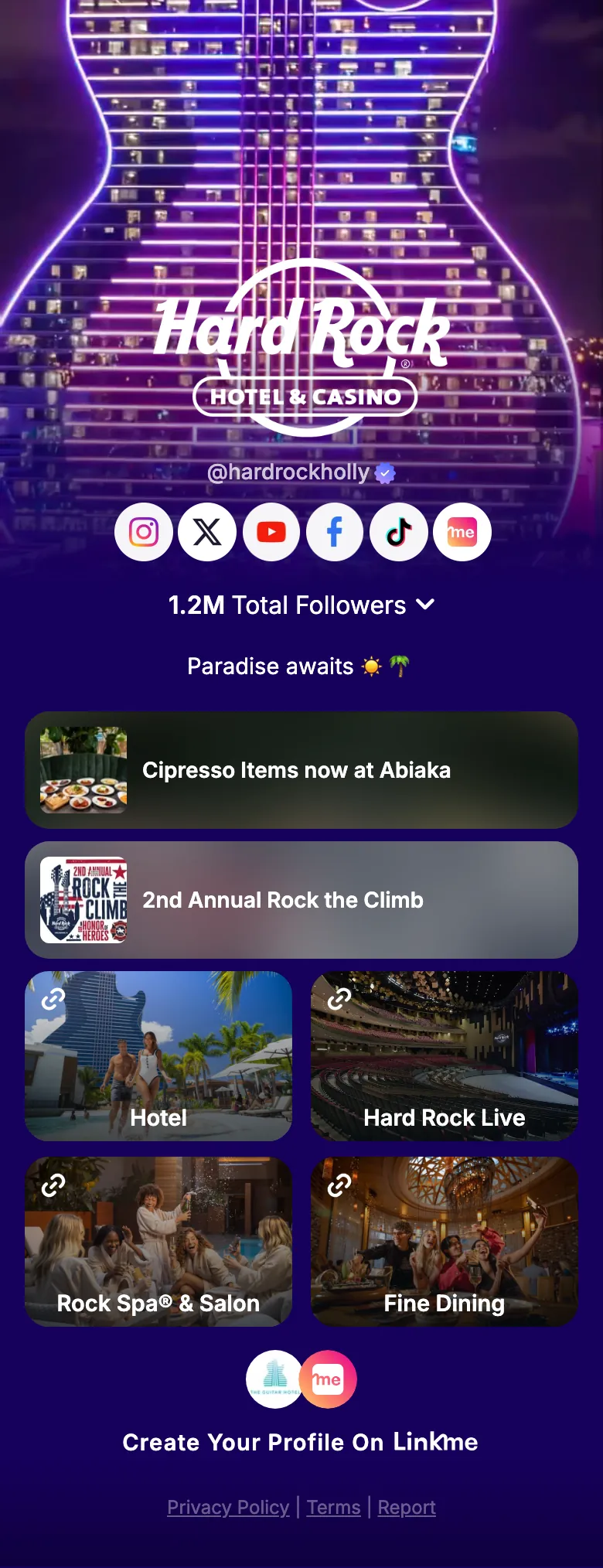
Resort and live venue
Hard Rock Hollywood
The hotel, Hard Rock Live shows, the spa, fine dining and this month's events, all from a single page.
Read the storylink.me/hardrockholly

Nightlife
LIV Miami
Upcoming nights run as an events row, and guests leave their email right on the page.
Read the storylink.me/livmiamiLIV runs its nights on Linkme.
“We've enjoyed using Linkme as a clean, centralized destination for our audience. It's intuitive, easy to manage, and fits seamlessly into our digital ecosystem.”
Live before the next on sale
How a tournament, venue or promoter moves onto Linkme.
- 1
Book a demo
Tell us about your venues, your events and the accounts you post from.
- 2
Put what's on next at the top
Add your upcoming events with their dates and ticket links, then tables, private events and the venue underneath.
- 3
Add the email sign up
Add a sign up under your name so every guest can join your list.
- 4
Connect accounts and set keywords
Connect your social accounts for Post to All and set DM keywords like LINEUP or TABLES on your posts.
- 5
Swap the link and print the QR
Put the page in every bio and print its QR code on posters, screens and wristbands.
Questions, answered
What should a venue put on its Linkme page?
What's on next, with dates and ticket links, then tables, private events, the venue and an email sign up. LIV's Linkme page runs a row of dated nights, each linking to its event page.
Can we sell tickets on Linkme?
No. Linkme links to your ticketing partner. Add ticket links to your page, or a ticket link to an event, and fans buy where you already sell.
Can we sync tour dates?
Yes. Sync events from BandsInTown and your upcoming dates appear on your page, each with its ticket link.
Can a ticket link go live at a set time?
Yes. The link scheduler puts a link live at the start date and time you set and takes it down at the end. It comes with every Business plan.
Can each venue or tour stop have its own page?
Yes. Every venue, stop or show can have its own Linkme page and link, and one account can run them all.
How do we collect emails from our Instagram followers?
Add a form with an email field to your Linkme page and put the page in your bio. Everyone who chooses to fill it in with their email lands in Leads, where you see Total contacts, Subscribed and Unsubscribed and can export a CSV.
How do we get started?
Book a demo. On a 30 minute call, one of our experts walks you through the pages and the dashboard, and helps you set up your pages and connect your accounts so you can go live.
Put every show one tap away
Book a demo and see how events and venues run their pages and posts on Linkme.

