Best Community Management Tools for Social Media Teams in 2026
Compare community management tools for social media teams by inbox features, moderation, listening, collaboration and pricing. Find the right fit.
On this page
- Key takeaways
- Which kind of community management tool do you need?
- Community management tools at a glance
- Five community management tools to consider
- How to choose the right tools for your community
- Check one representative community workflow before choosing
- Frequently asked questions
- Choose around the community work your team needs to do
A community manager might answer product questions under a launch post, acknowledge regular customers, investigate a complaint and spot a topic the audience keeps asking about. Those jobs involve different conversations, decisions and tools.
The best community management tools for your team depend on where that work happens. An inbox can organize comments and DMs on your social accounts. A listening tool can help you understand wider public conversations. A hosted community platform gives members a dedicated place to meet and participate.
This guide compares five options for social media teams: Linkme, Sprout Social, Agorapulse, NapoleonCat and Brand24. The first four support audience-response work; Brand24 adds a listening option for teams that need to look beyond incoming interactions.
Which kind of community management tool do you need?
Start with the work you want to improve. Several products use the same category language while solving different problems.
| Your main job | Relevant tool category | What to check |
|---|---|---|
| Answer questions, participate in discussion and moderate interactions on connected social accounts | Social engagement inbox or social management suite | Message coverage, response controls, team access and reporting |
| Discover and interpret public conversations beyond your own posts | Listening and monitoring software | Sources, keywords, mention limits, update frequency and analysis |
| Run a dedicated community with member accounts, discussions and events | Hosted community platform | Member access, discussion spaces, moderation and events |
The shortlist below focuses on social engagement and complementary listening. If you need member logins, private discussion spaces or community events inside your own platform, evaluate hosted community software for that job.
For a smaller operation, your existing native social tools may cover the work. Identify the specific problem before adding a subscription: missed conversations, repetitive typing, unclear responsibility, moderation volume or limited visibility beyond your accounts.
Community management tools at a glance
| Tool | Main reason to consider it | Relevant pricing structure | Buying consideration |
|---|---|---|---|
| Linkme | Audience replies alongside publishing, DM automations and business pages | Business starts at $999/month for the broader package | Coordination through notes; confirm inbox access for your team |
| Sprout Social | Social engagement with customer-care workflows and reporting | Standard starts at $199/seat/month, billed annually | Required reporting, profiles and Listening can change the tier or add-ons |
| Agorapulse | Inbox assignment and organic/paid-comment handling | Professional is $119/user/month billed annually, or $149 with monthly billing | Saved replies and other organization features require a higher tier |
| NapoleonCat | Moderation-heavy response work and team tasks | Configurable bundles of seats, profile slots and monthly inbox capacity | Select the tier and capacity that cover the moderation work |
| Brand24 | Public mention discovery and listening analysis | Team is $299/month billed annually, or $349 with monthly billing | A listening complement; check keyword limits, volume and update frequency |
These prices cover different packages. An organization-wide Business offer, one user’s social management subscription and a listening allowance are different purchasing units. Compare the complete configuration your team needs.
Five community management tools to consider
1. Linkme: social replies and DM automations in a broader Business workflow
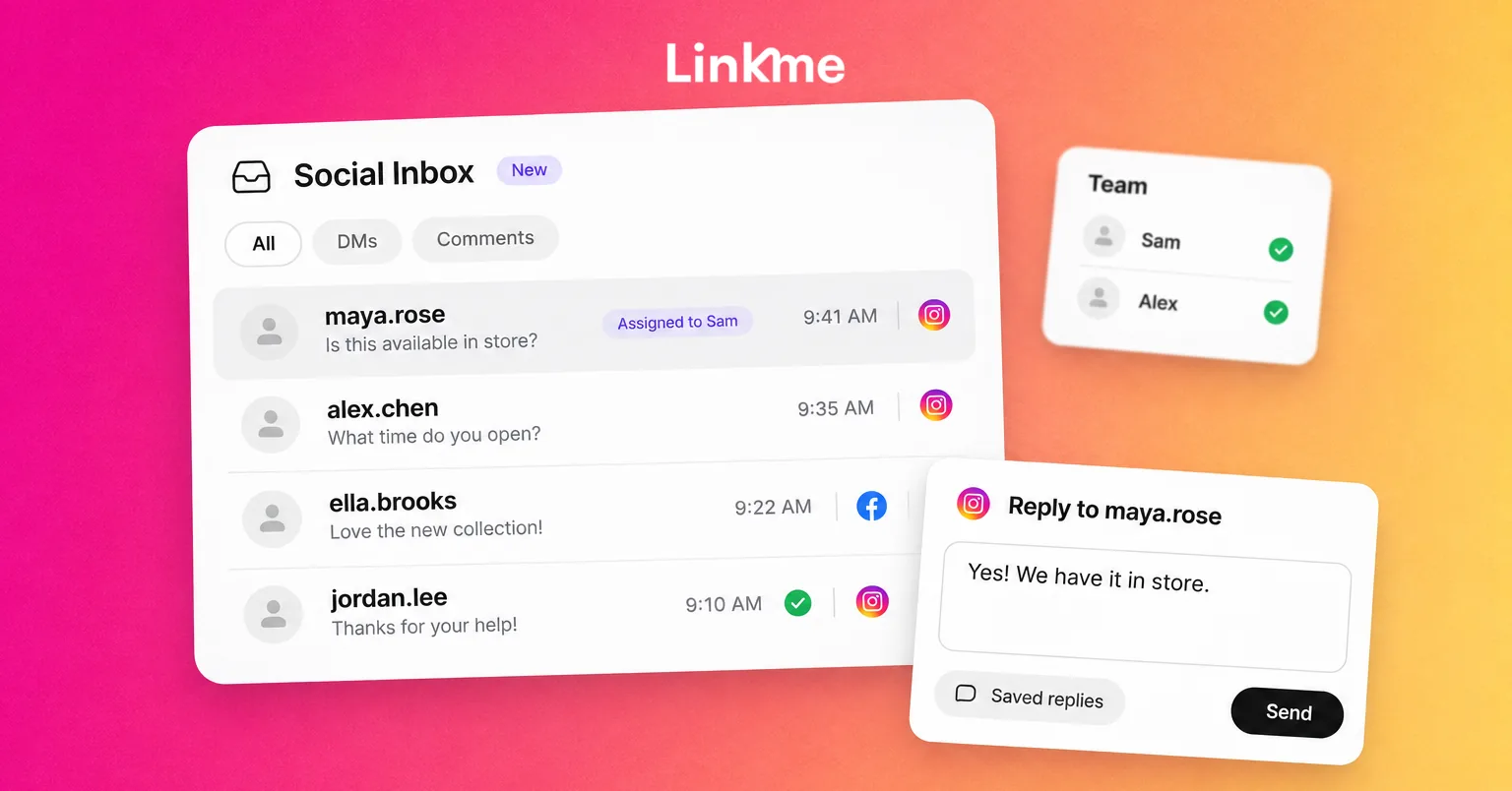
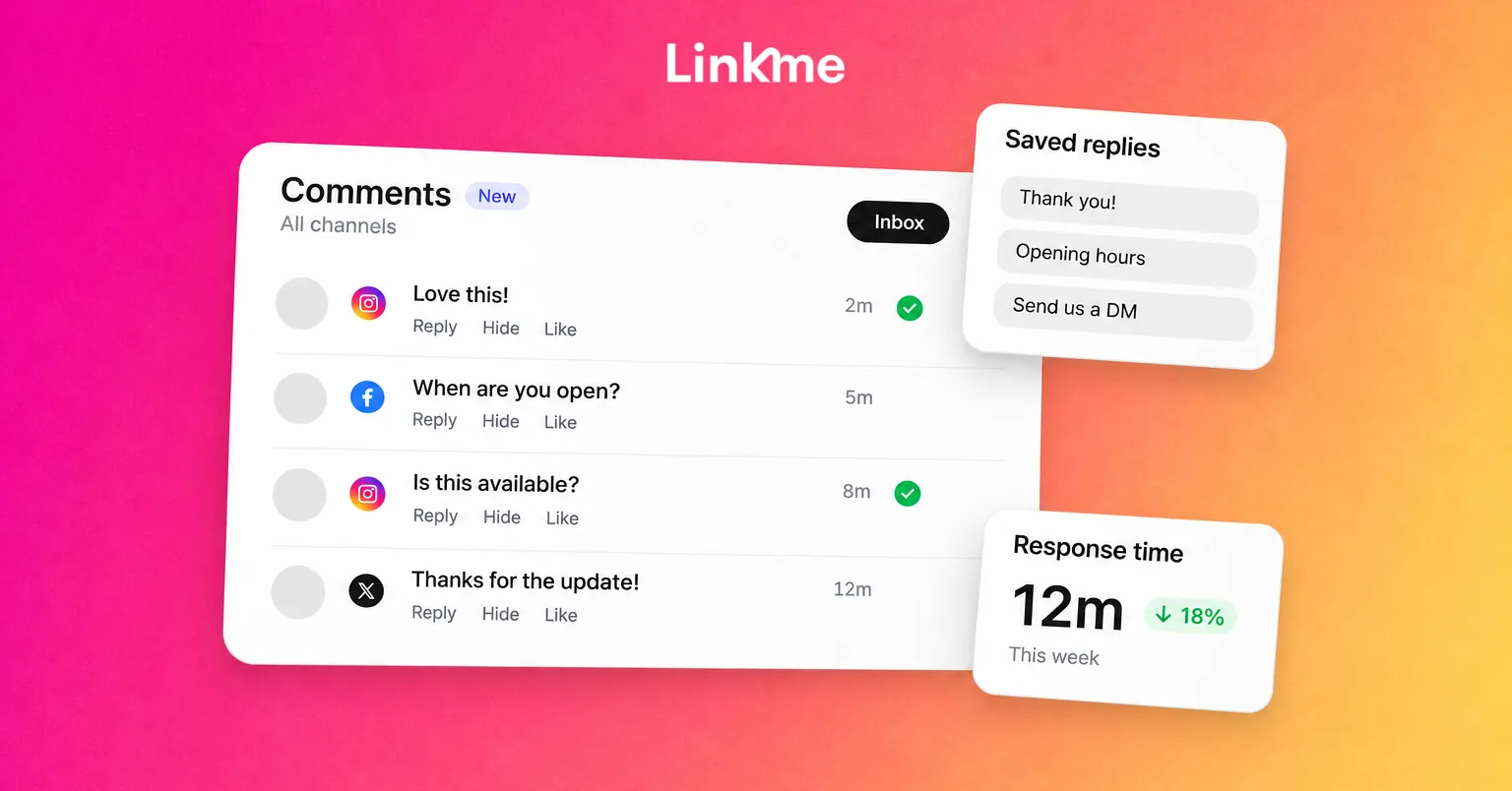
Linkme’s Social Inbox supports Instagram and Facebook messages and comments, with the original post available for comment context. Internal notes, saved replies and resolution help responders work through questions and leave useful information for colleagues.
That combination suits a business evaluating audience replies alongside publishing, DM automations and business pages. For example, imagine a retailer promoting a new collection. The team can use a saved response for a common product question, handle a specific customer issue personally, and use recurring questions to improve its next post or answer.
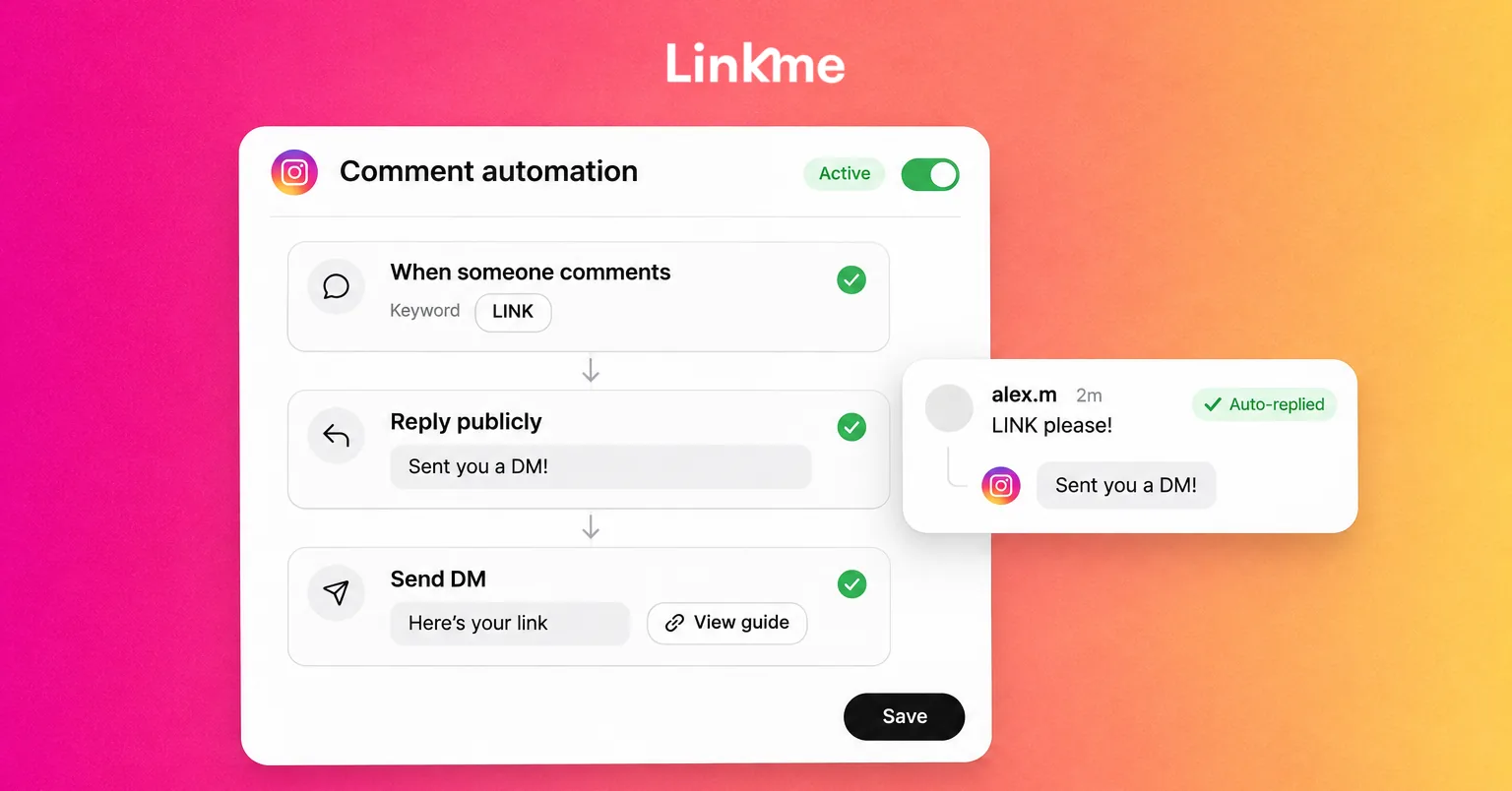
Linkme’s Instagram DM automations can handle repeat requests while people deal with questions requiring judgment. Pause automation for a conversation before taking over personally: sending a manual reply does not pause it automatically. Resume it deliberately when appropriate.
Team coordination in Social Inbox uses notes rather than built-in conversation assignment. Agency-manager access does not include the inbox, so confirm the access your responders need. Each connected account has its own inbox; check how account switching fits your workload.
Pricing and fit: Linkme Business pricing starts at $999 a month, with tailored allowances. The broader package includes content calendar and publishing, social DM/comment automations, and Pages/QR capabilities. Consider that whole workflow when evaluating the package. For an inbox-only requirement, compare the inbox-focused plans of the other tools on your shortlist against the response work you need.
Linkme’s fit here is social engagement within that Business workflow. Teams needing enforced ticket assignment, wider listening or a hosted member community should evaluate those requirements separately.
2. Sprout Social: community engagement with customer-care reporting
Sprout Social combines its Smart Inbox with collaboration and customer-care tools. It is worth evaluating when community work involves several social accounts, a team handling ongoing conversations, and reporting that needs to reach people outside the social department.
Its engagement coverage includes different comments, mentions and private messages across supported networks. Check the exact surfaces your team uses rather than assuming every connected network supports the same actions.
The plan distinction matters. Standard includes the consolidated inbox and five social profiles. Professional adds unlimited social profiles and message tagging. Advanced adds further customer-care reporting, individual-user productivity reporting and helpdesk integrations. Engagement reporting exists below Advanced, so choose around the particular report or integration you need.
Included keyword monitoring and Sprout’s separately priced Listening product are also different capabilities. A team that wants wider listening should include that requirement in its cost comparison instead of assuming the inbox subscription covers it.
Pricing and fit: Sprout’s plans list Standard at $199 per seat/month, Professional at $299, and Advanced at $399, billed annually. Its lower-priced Essentials plan focuses on publishing and excludes Smart Inbox. Start your comparison with the plan that supplies your community workflow, then count seats and necessary add-ons.
Sprout is a relevant option when a broader social care operation and its reporting justify that configuration.
3. Agorapulse: team inbox assignment and paid-comment handling
Agorapulse organizes social interactions into an inbox where teams can respond, assign items and review completed work. Its Professional plan is relevant when a community manager needs to route a question to a colleague while handling other organic or paid conversations.
For example, one person could take responsibility for a product question while another works through comments on a promotion. Assignment makes responsibility visible, though the team still needs a process for checking context and avoiding duplicate replies.
Check interaction coverage closely. Agorapulse supports TikTok comments, but TikTok DMs do not sync to its inbox. X inbox access requires the X Plus add-on. Your publishing network list therefore should not be the sole basis for choosing the engagement setup.
Professional includes inbox assignment and ad-comment handling. Advanced adds saved replies, labels and other inbox organization features. Limited automatic moderation is available across its standard social plans; check the rule allowance and available actions for the network you intend to moderate.
A practical detail for mixed workflows: replying directly on the native social platform does not automatically mark that item reviewed in Agorapulse. Include that check if colleagues alternate between the native app and the shared tool.
Pricing and fit: Agorapulse’s pricing lists Professional at $119 per user/month billed annually, or $149 with monthly billing. Advanced is $149 per user/month billed annually, or $199 with monthly billing. Include any additional profiles or required add-ons when calculating the setup.
Consider it when assignments and paid-comment work are central to the team’s day, and compare Advanced if saved replies and its other organization features are essential.
4. NapoleonCat: moderation-heavy social engagement
NapoleonCat focuses on social inbox work, team tasks and moderation. Its tools bring together response context, internal notes and interaction history, with review management for supported sources and reporting on the moderation team’s work.
That makes it a relevant option for teams handling a substantial flow of comments, repeat questions, reviews and content requiring moderation. Check which actions it supports on your accounts: seeing a platform logo does not tell you whether every message type or moderation action is available there.
Pro is the inbox-focused tier, while Expert adds automation capabilities. Standard’s publishing and reporting offer should not be treated as the same inbox package. Automated moderation also needs a clear policy: a critical customer comment and spam require different decisions.
Pricing and fit: NapoleonCat’s pricing uses configurable bundles based on seats, social profile slots and inbox capacity. Monthly inbox capacity counts the incoming messages, comments, reviews and mentions pulled into the inbox. Check the allowance against your usual volume and any campaign spikes, along with the cost of extra capacity or other add-ons.
Its trial uses Expert features, so confirm which capabilities remain in the paid package you select. For moderation-heavy work, the tier, action coverage and incoming volume are more useful buying checks than a single headline price.
5. Brand24: listening beyond your own social inbox
Brand24 is a listening complement for community teams that need to discover and interpret public conversations beyond incoming comments and DMs. It tracks mentions of selected keywords across supported social and other online sources, with alerts and analysis that help a team investigate recurring topics.
Imagine your team keeps receiving the same question about a product. A listening tool can help you investigate whether that topic also appears in wider public discussion. The findings may inform a better explanation, a content update or feedback for the product team.
This is a different job from handling an individual customer’s private message. Evaluate the sources, relevance of results, analysis and update frequency. Do not assume a mention dashboard supplies the same shared response workflow as a social inbox.
Brand24’s Mentions view lets you examine results and visit their original sources. Reviewing those conversations remains important when interpreting sentiment or deciding whether a response is appropriate.
Pricing and fit: Brand24’s Team plan is $299/month billed annually, or $349 with monthly billing. It includes seven keywords, 10,000 monthly mentions, unlimited users and hourly updates. Higher plans change allowances and update frequency; hourly updates should not be treated as real-time monitoring.
Consider Brand24 when wider public listening is the missing part of your community workflow. It may sit alongside the tool your team uses to answer audience questions.
How to choose the right tools for your community
List the interactions you actually handle
Write down your social accounts and separate organic comments, ad comments, DMs, mentions and reviews. Then list the actions your team needs for each: reading, replying, moderating where appropriate, or escalating.
Include ordinary positive engagement. Recognizing a regular contributor or answering a useful discussion question matters too. A tool should support the way your team participates, rather than turning every interaction into a support case.
Match collaboration to the decisions your team makes
Decide who responds, who can approve a remedy and when someone takes over from a colleague. Then compare the controls that support those responsibilities.
Shared visibility, internal notes, assignment, collision indicators and enforced reply approvals are separate capabilities. Publishing approval does not establish that replies are also blocked until reviewed. Ask about the exact action and permissions your process requires.
Decide whether you need wider listening
An inbox can organize incoming interactions while a listening tool helps you investigate public topics elsewhere. Some teams need both; others can begin with the questions and feedback already reaching their own accounts.
Look for a useful decision the information will support. That might be improving a recurring answer, recognizing an emerging concern or passing audience feedback to another department. A larger collection of mentions is valuable when someone can interpret and act on it.
Compare the total usable package
Count responders, connected profiles, expected interaction volume and any listening keywords or mention allowances. Include the plan that supplies the required features and any necessary add-ons.
Keep annual-billing monthly equivalents separate from month-to-month prices. Compare an organization bundle with the total subscriptions and features you need, rather than with one seat of a narrower tool. A trial’s capabilities may also differ from the paid plan you choose.
Use this worksheet for your shortlist:
| Requirement | Our actual need | Tool/plan that covers it | Allowance, exclusion or added cost |
|---|---|---|---|
| Channels and interaction types | [accounts; organic/paid comments, DMs, reviews] | [tool/plan] | [unsupported surfaces] |
| Responders and access | [people and responsibilities] | [tool/plan] | [seat cost or access limit] |
| Moderation and escalation | [actions and authority] | [tool/plan] | [tier, rule or network restriction] |
| Wider listening, if needed | [topics and sources] | [tool/plan] | [keywords, mentions and update frequency] |
| Reporting and learning | [reply performance, moderation activity, recurring questions or wider trends] | [tool/plan] | [included reports, exports or add-on] |
| Total usable cost | [billing period and configuration] | [base package plus required extras] | [confirmed total for this setup] |
Check one representative community workflow before choosing
During a trial or product demonstration, use the work your team expects to do as the basis for evaluation.
For response and inbox tools:
- Open a normal audience question and check the original content and reply context.
- Check a private question separately from a public or paid comment, including the available reply route.
- Have another authorized person take the next action using the collaboration controls provided.
- Review a compliment, a legitimate complaint and spam; check the appropriate action for each supported network.
- If automation is involved, check how a person takes over and how automation resumes.
For listening tools: run a representative topic query, inspect the relevance and sources of the results, and check how frequently they update.
For either category: confirm that the records and reports answer your questions, then calculate the full cost of that configuration.
Frequently asked questions
What does a community management tool do?
It supports part of the work involved in engaging an audience and managing community interactions. Social inbox tools help with incoming conversations and moderation; listening tools help discover and analyze wider public discussion. Hosted community platforms provide dedicated spaces for members. Check which job a product actually covers.
Is community management software the same as a social media scheduler?
A scheduler organizes publishing. Community tools support interaction, moderation, listening or member participation. Some social management suites combine publishing and engagement, but their scheduling integrations do not automatically establish inbox coverage.
Do we need a separate social listening tool?
Consider one when you need sources or analysis beyond the conversations arriving on your accounts. First check whether the software you already use covers those requirements and whether listening is included or sold separately.
Can we start with free or native tools?
Yes, if they cover your accounts and working process. A separate tool becomes worth evaluating when you can identify a specific limitation, such as coordinating responders, managing moderation volume or investigating wider conversations.
Will these tools run a private member community?
If you need member access, dedicated discussion spaces and events, evaluate hosted community platforms. A social inbox or listening subscription should not be assumed to provide that member experience.
Choose around the community work your team needs to do
Start with your accounts, audience interactions and team responsibilities. Shortlist tools that cover those needs, then check the relevant plans, access and allowances. A response tool and a listening tool may complement each other when they serve different parts of the work.
If you are evaluating Linkme for Business, explore how its Social Inbox and DM automations fit alongside your publishing and business pages. Book a demo to discuss your accounts, access and Business package.