Instagram Comment Automation: How to Automate Replies and DMs
Learn how Instagram comment automation works. Set up relevant public replies and private DMs, test your trigger, and know when a person should take over.
On this page
- Key takeaways
- What is Instagram comment automation?
- Choose a comment that is worth automating
- What you need before setting it up
- How to set up Instagram comment automation
- Private replies and follow-ups have different limits
- Check whether the automation helps the business
- Why an Instagram comment automation may not work
- Frequently asked questions
- Start with one useful request
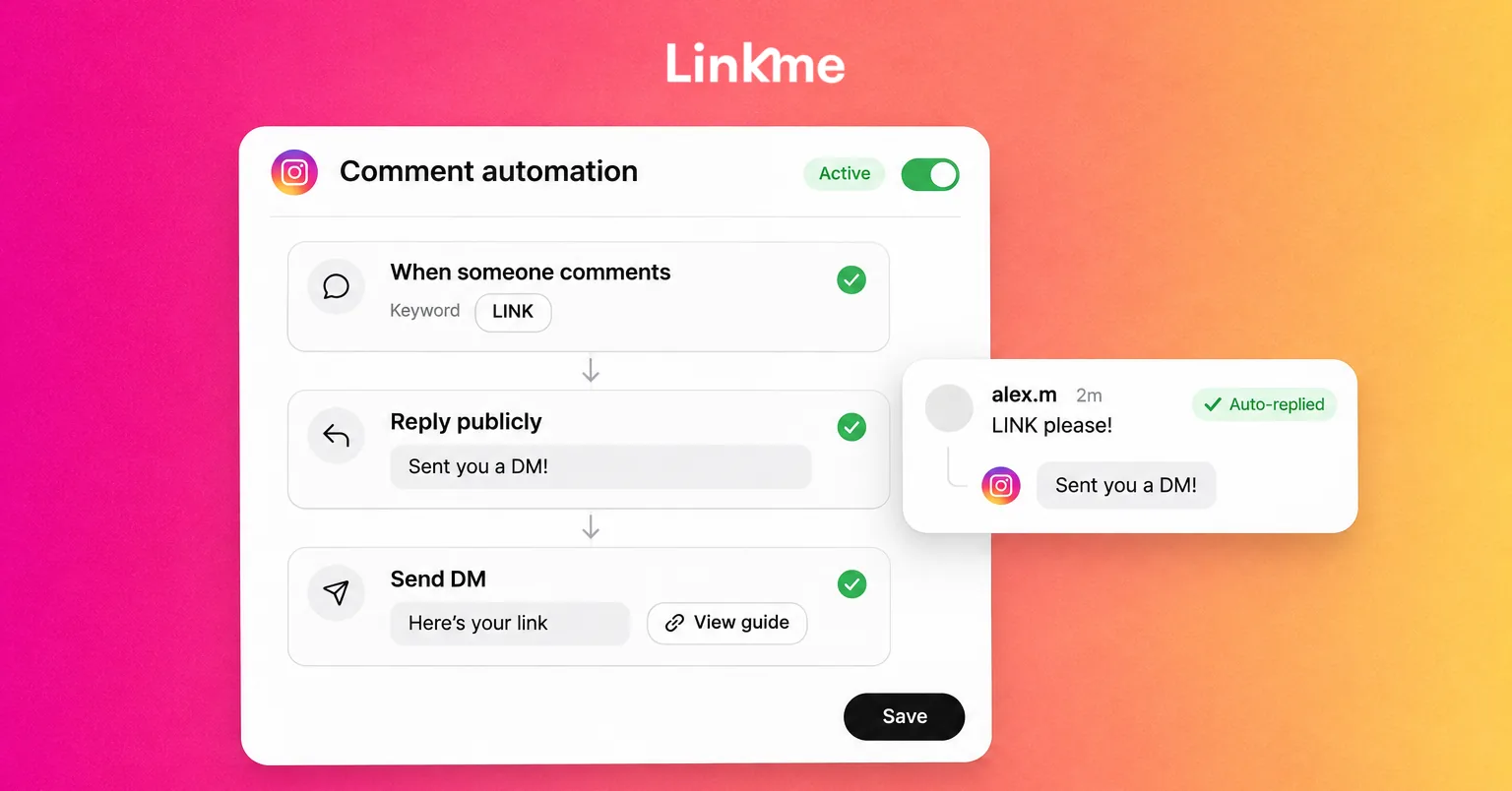
Instagram comment automation lets a business respond when someone leaves a matching comment on its posts or Reels. The response can be a public reply, a private message or the supported combination you configure.
For example, a fitness studio can invite people to comment CLASSES to receive its class guide. The automation sends the requested link, while staff handle questions about a particular session or location.
A useful setup starts with a clear request and a relevant answer. Choose what should trigger the response, write the message, test the recipient’s experience and monitor what happens after launch.
What is Instagram comment automation?
Comment automation runs a configured action when a comment meets a rule. A keyword can trigger a response on a selected post, or a broader rule can respond to comments across supported content.
The main response types serve different purposes:
| Action | Where the response appears | Useful purpose |
|---|---|---|
| Public comment reply | Under the person’s comment | Answer a shared question or acknowledge a request |
| Private reply to a commenter | A private message | Send the relevant resource or destination link |
| Reply to an incoming DM | Inside a conversation the person has messaged | Answer an inbound question through a separate trigger |
A saved reply that someone inserts manually still requires a person to send it. An automation runs when its configured conditions match.
This guide focuses on responding to people engaging with your business’s content. Sending promotional comments across unrelated accounts is a different activity.
Choose a comment that is worth automating
Look for a repeated request with a consistent answer. A class guide, product-information page or event-details link can be useful because the person knows what they are asking to receive.
| Situation | Suitable response | When a person should help |
|---|---|---|
| Someone requests the resource advertised in your post | A private reply containing that resource, with an optional public acknowledgement | They ask a question the resource does not answer |
| People repeatedly ask the same general question | A relevant public answer, with private follow-up where appropriate | The answer depends on their circumstances |
| Someone raises a complaint, cancellation or unusual issue | A human response | A generic promotional message would miss the request |
With Linkme’s Instagram comment and DM automations, you can select posts and configure keyword or any-comment triggers.
A keyword gives the campaign a clear promise: “Comment CLASSES for our class guide.” An any-comment rule has broader coverage, so consider what happens when someone leaves praise, asks an unrelated question or makes a complaint. Start with a focused rule that answers a recognizable request.
What you need before setting it up
Have these ready:
- An eligible Instagram professional account: Business or Creator, connected through the tool’s authorization process with the required access. Follow the connection route provided; a linked Facebook Page is not a universal requirement across all integrations.
- A supported post or Reel: Choose the content the rule will watch and confirm what the post promises.
- A working destination: Prepare the resource, product page or other relevant link before inviting people to request it.
- The right permissions and allowance: An authorized person connects the account, and the person configuring or activating the automation needs the relevant access and sufficient plan allowance.
- Someone responsible for follow-up: Decide who will check activity and answer questions that need individual attention.
The workflow below uses Linkme. If you evaluate another tool or a native option available to your account, check that it supports the exact trigger and response you need.
How to set up Instagram comment automation
1. Select the account, post and response type
In Linkme’s Automations area, choose the connected Instagram account and the eligible post or Reel the rule should watch.
Decide whether you want a public comment reply, a private reply to the commenter or both. Incoming-DM replies use a separate automation type, so choose the action that matches how the person contacted you.
Start with one campaign post. Linkme also supports broader post coverage, including future published content, but that scope needs a message that will remain relevant. A guide linked from one launch post may be inappropriate for a later announcement.
Check existing rules before adding another. Linkme identifies posts already assigned to an automation. Also check any other automation tools connected to the account: controls inside one product do not prevent another product from sending its own response.
2. Set a keyword that matches the post’s promise
Choose a clear keyword and explain the result in the post caption. CLASSES is useful when the promised response contains a class guide. A vague term can match comments that were never requests for that resource.
Test the matching behavior you plan to use. Check capitalization, comments containing additional words and any exclusion settings available in your workspace. Avoid assuming the rule understands a complaint simply because it can recognize a keyword.
For example, “Are CLASSES cancelled tonight?” needs a different answer from a request for a general class guide. Include that question in your tests. If the rule cannot distinguish it, use a more specific request keyword or handle those responses manually.
3. Write the public reply and the private message
Write only the response types you selected. A public-only rule needs a useful public answer; a comment-to-DM rule needs a private message that delivers what the post promised.
Keep the public acknowledgement appropriate to the thread. If a private message is part of the setup, tell the person where to look without claiming it has arrived before delivery is confirmed.
For the initial private reply, use a concise message and the relevant destination. Linkme’s comment-triggered private reply carries one link. Multiple link buttons belong to its incoming-DM automation, which is a separate response type.
Here is a complete hypothetical example for a local fitness studio. The studio prepares its class guide before launching the campaign. Replace the bracketed URL with the actual resource.
| Part of the campaign | Example copy |
|---|---|
| Post call to action | Choosing your first class? Comment CLASSES and we’ll send you our class guide. |
| Optional public acknowledgement | Look for a private message with the class guide. If it isn’t in your inbox, check message requests. |
| Initial private reply | Here’s the class guide you asked for: [class guide URL]. It explains the formats and what to bring. Reply here if you have a question. |
If the person asks about a class time or location missing from the guide, a staff member can check the timetable and respond. Keep the automated reply focused on the guide, and leave those specific questions to staff.
The destination can be a relevant external page; it does not have to be a Linkme page. Keep access consistent with the promise in the post. If you promised a guide link, deliver it directly instead of adding an unexpected marketing-signup requirement.
A separate invitation to receive email updates is a separate choice. Requesting the class guide does not itself subscribe the person or book a class.
4. Test the trigger and recipient experience
Use Linkme’s “Try it” dry run to check the rule first. Then enable a narrowly scoped test on one suitable post and verify the actual recipient experience with a separate account you are authorized to use.
A useful test checks that:
- The rule watches the correct account and post.
- A nonmatching comment does not receive an unwanted reply. Test this before a successful trigger, or use another eligible test account, so repeat-send limits cannot hide an overly broad match.
- The advertised keyword triggers the selected response.
- The public response, if selected, is appropriate.
- The private message, if selected, contains the right link and can be found by the recipient.
- The destination opens correctly on a phone.
- Pause controls, the process for honoring requests to stop, and the plan for human responses work as expected.
Check the public reply and private message separately. A successful dry run or visible public acknowledgement does not prove that the private message arrived.
Repeated tests may be affected by reply limits or product safeguards. If a second comment from the same test account receives no new message, inspect the rule’s activity and restrictions before treating it as a failure. Do not repeatedly retry or add duplicate rules to force another send.
Pause a failing test rule while correcting it. Promote the keyword campaign or expand the scope only after the controlled test behaves as intended. For the product setup sequence, see how to set up comment replies in Linkme.
5. Launch the campaign, monitor and keep a person available
After testing, monitor real activity, missed runs and clicks. Check errors and connection health, and confirm that the destination still matches the offer. Update or pause a rule when its guide, event or promotion changes.
Choose someone to handle questions, complaints and requests to stop. Honor opt-outs and pause controls; a new keyword or another connected tool should never become a way around someone’s choice.
When a conversation needs personal attention, you can pause an automation and answer personally through Linkme’s Social Inbox. Pause it for that conversation before taking over. Sending a manual reply does not pause the automation automatically; resume it only when appropriate.
Private replies and follow-ups have different limits
A comment-triggered private reply starts with a limited response to that comment. Under Meta’s private-reply rules, one initial private reply can be sent within seven days of a post or Reel comment. Follow-up messages require the recipient to respond and must be sent within 24 hours of that response.
That makes the first message important: include the information you promised instead of relying on an unsolicited second message to deliver it.
A private reply goes to the follower’s inbox or, for a non-follower, the Requests folder. Tell people where to look, and verify the actual experience during testing.
Reading the message or clicking an external link should not be treated as permission to continue sending messages. A product’s repeat-send safeguard is also separate from the platform’s messaging window. Waiting for a tool’s cooldown to expire does not create permission for another follow-up.
Check whether the automation helps the business
Start with the campaign’s purpose. Did people request the information, did the automation run, and did they follow the relevant link?
Linkme reports automation activity, clicks and click rate. Compare the appropriate account, rule and campaign period, using the metric definitions shown in the report.
Then check the outcome separately in the destination’s system. For the studio, that could mean class-guide visits, questions or completed bookings. A public acknowledgement is not a lead, and a link click does not prove a booking.
For teams evaluating Linkme for Business, this provides a concrete workflow to discuss: a relevant request, a prepared response, monitored activity and a person available when the conversation needs more help.
Why an Instagram comment automation may not work
Use the symptom to guide the checks rather than assuming every issue needs a reconnection or another send.
| Symptom | What to check |
|---|---|
| The rule does not run | Correct account, selected post, trigger, active rule, connection, permissions and plan allowance |
| A public reply appears but the private message is missing | Message requests, private-reply eligibility, failed activity, connection status and existing replies |
| A repeated test does not send another message | Private-reply limits, the rule already used and product repeat-send safeguards |
| The wrong resource is sent | Keyword scope, selected-post versus all-post coverage, assigned rule and destination freshness |
| A person and the automation both answer | Manually pause automation for that conversation before taking over; replying alone does not pause it |
Inspect the recorded issue before changing the setup. A rule outside its selected scope, a paused conversation and an exhausted allowance require different actions.
Frequently asked questions
Can I automate public replies without sending a DM?
Yes. Linkme’s setup distinguishes public comment replies from private replies to commenters. Choose the public-reply action and write an answer appropriate for the thread.
Can Instagram send a DM when someone comments a keyword?
A supported automation can use a qualifying comment on a connected professional account’s content to trigger a private reply. Configure the keyword, post scope and response, then test delivery. Account access, platform rules and product limits still apply.
Does this work on Reels?
Linkme supports comment automation on eligible Instagram posts and Reels. Confirm that the selected Reel appears in the account and scope you are configuring.
Can I keep messaging someone after sending the link?
Further messages depend on the recipient responding and the applicable messaging window. A comment or external link click alone does not authorize an ongoing sequence. Keep any email-marketing subscription choice separate too.
Will comment automation increase reach or sales?
It can help deliver requested information consistently and reduce repetitive manual replies. Results depend on the audience, offer and customer experience. Assess useful actions and separately measured outcomes rather than assuming extra replies guarantee reach or sales.
Start with one useful request
Choose a resource people ask for, write a clear keyword promise and test the complete response on one post. Keep the guide current and make someone responsible for the conversations that need individual attention.
Book a Linkme demo to explore how comment replies and requested links could fit your business’s Instagram workflow.